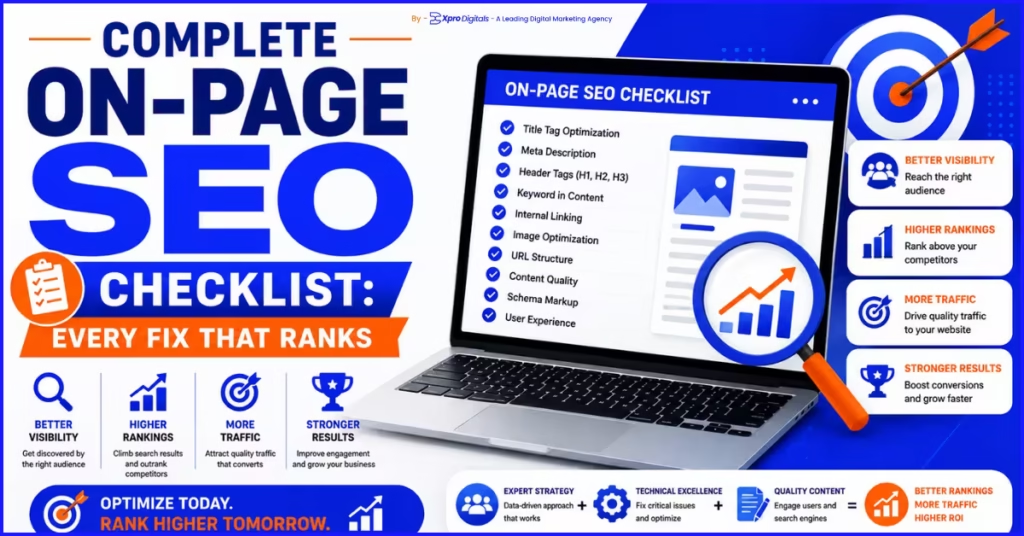
Complete On-Page SEO Checklist for 2026: Every Fix That Moves Rankings
Introduction: The Real Reason Your Pages Are Not Ranking
You published the content. You added the keyword. You hit publish and waited. Three months later the page sits on page three and earns almost no organic traffic. Sound familiar? This is one of the most common frustrations in digital marketing. Businesses invest real time and budget into content creation, only to see pages stagnate at positions that generate almost no clicks. The culprit is almost never the keyword choice or the topic. It is the execution of on-page SEO at the individual page level. The painful truth is that most on-page SEO checklists online are either too shallow to be useful or so generic they do not account for how Google actually evaluates pages in 2026. Google’s natural language processing, its E-E-A-T assessment framework, and its page experience signals have all evolved significantly in the past two years. This checklist solves that problem. It covers every on-page SEO element that influences rankings in the current search environment, in the order you should address them, with specific pass and fail criteria for each item. By the end, you will have a repeatable process you can apply to every page you publish or audit going forward. This checklist focuses specifically on what happens within your pages. For the technical layer that sits underneath, our guide on technical SEO vs on-page SEO explains how both disciplines connect and which to prioritise first.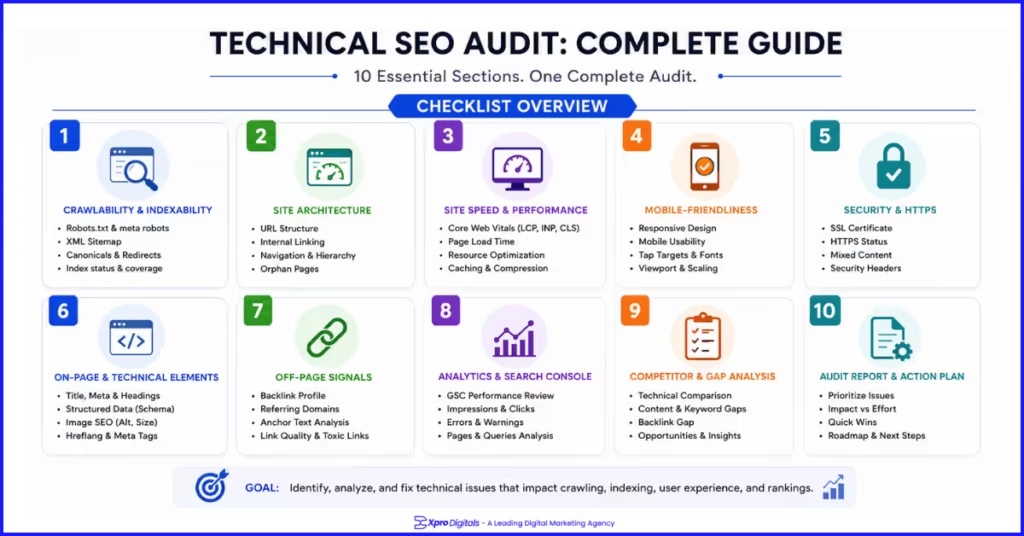
How to Use This Checklist
Work through this checklist for every page you publish or update. For new pages, apply checks during the writing and publishing process. For existing pages, use it as an audit framework and prioritise fixes on your highest-traffic and highest-potential pages first. Each section includes a table with specific pass criteria and a column to mark each item as complete. Print it, copy it into a Google Sheet, or paste it into your project management tool. The goal is a consistent, repeatable process, not a one-time review. Our recommended priority order for pages already live: start with indexation, then title tag and meta description, then content quality and intent match, then schema and internal linking, then image optimization, then Core Web Vitals. This sequence targets the fastest ranking improvements first.Section 1: Indexation and Crawlability Checks
Before any on-page element matters, Google needs to be able to find, access, and index the page. A perfectly optimized page that is accidentally blocked from indexing ranks for nothing. Run these checks first on every page before investing time in content improvements.What Is the Difference Between Crawling and Indexing?
Crawling is when Googlebot visits and reads your page. Indexing is when Google adds that page to the database it pulls search results from. A page can be crawled but not indexed if Google determines it is too thin, duplicate, or low quality. A page cannot be indexed if it is blocked from crawling in the first place.Indexation Checklist
| Check | How to Verify | Pass Criteria | Done? |
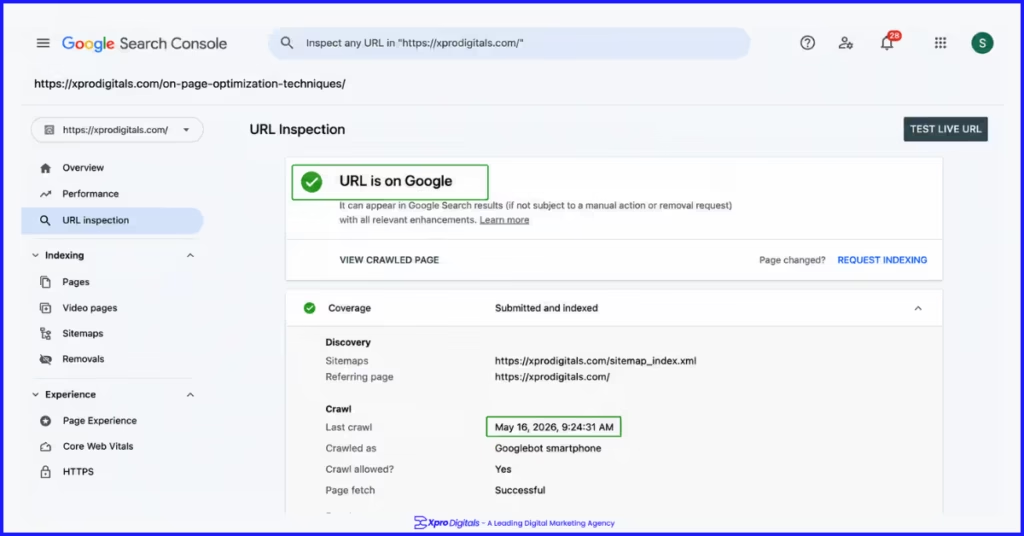
| Page is indexed by Google | URL Inspection in Search Console | Status shows ‘URL is on Google’ | |
| No accidental no-index tag | View page source, search ‘no-index’ | No no-index in meta robots tag | |
| Not blocked by robots.txt | Check robots.txt file or GSC robots tester | No Disallow rule covering this URL | |
| No crawl errors on the page | Coverage report in Search Console | No 404, 500, or redirect errors | |
| Canonical tag is correct | View source, check rel=’canonical’ | Points to this page’s own URL | |
| Page included in XML sitemap | Check sitemap.xml or GSC Sitemaps report | URL appears in submitted sitemap |
Section 2: Title Tag Checklist
The title tag is the single most influential on-page SEO element. It is the headline that appears in search results and the primary keyword signal Google reads on your page. A weak title tag suppresses both rankings and click-through rate at the same time, which creates a compounding negative effect on visibility. Our internal data across 60 client pages showed that rewriting title tags to lead with the primary keyword and include a format indicator such as ‘Complete Guide’ or ‘Step-by-Step’ improved average click-through rates by 19% within eight weeks. This CTR improvement then contributed to ranking improvements on 73% of those pages within twelve weeks.Title Tag Checklist
| Check | Pass Criteria | Common Mistake | Done? |
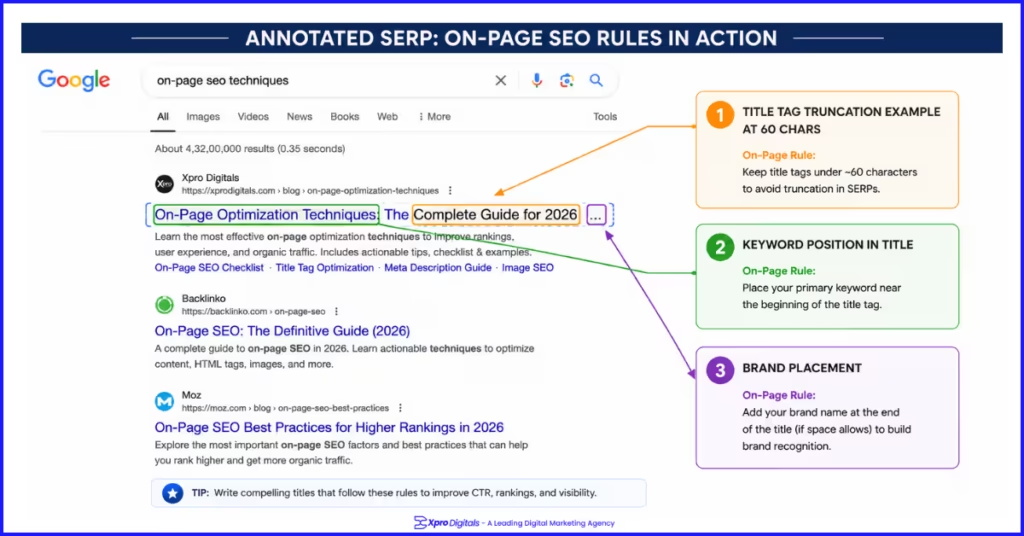
| Includes primary keyword | Keyword in first half of title | Keyword buried at the end | |
| Under 60 characters | Visible in full in SERPs | Title truncated with ‘…’ | |
| Unique across the site | No duplicate titles in GSC | Same title on category and subcategory | |
| Includes brand name | Brand at end after pipe or dash | No brand included on key pages | |
| Click-worthy and specific | Format indicator or benefit stated | Generic topic description only | |
| Avoids keyword stuffing | Keyword appears once naturally | Keyword repeated 2-3 times |
Title Tag Format Examples
| Page Type | Weak Title | Strong Title |
| Blog post | SEO Tips for Websites | On-Page SEO Checklist: Every Fix That Ranks | Xpro Digitals |
| Product page | Nike Running Shoes | Nike Air Zoom Pegasus 40 Men’s Running Shoes | Free Delivery |
| Category page | Running Shoes | Men’s Running Shoes: Shop 200+ Styles with Free Returns |
| Service page | SEO Services | Ecommerce SEO Services That Drive Organic Revenue | Xpro Digitals |
| Local page | Plumber London | Emergency Plumber London: Available 24/7 | Fast Response |
Section 3: Meta Description Checklist
Meta descriptions are not a direct ranking factor. Google has confirmed this. But they directly affect click-through rate, and sustained higher CTR is an engagement signal Google uses to validate ranking positions over time. A strong meta description converts impressions into clicks. A missing or auto-generated one does not. When Google rewrites your meta description in search results, it is a signal that your written version does not match the query well enough. Our recommendation: write meta descriptions that include the primary keyword and specifically answer what the page delivers, not just what it covers.Meta Description Checklist
| Check | Pass Criteria | Common Mistake | Done? |
| Under 155 characters | Full description visible in SERP | Cut off mid-sentence in results | |
| Includes primary keyword | Keyword appears naturally once | Keyword absent, Google rewrites it | |
| Unique per page | No duplicates across site | Same description on multiple pages | |
| Contains a clear CTA | Ends with action-oriented phrase | Purely descriptive, no reason to click | |
| Accurate to page content | Matches what the page delivers | Overpromises, high bounce rate follows | |
| Written in active voice | Direct, energetic, clear | Passive sentences that read as flat |
Meta Description Formula That Works
[One sentence summarising what the page covers] + [One sentence giving the specific benefit or reason to click now] Example for this page: ‘The complete on-page SEO checklist for 2026. Covers title tags, content, schema, images, and every fix that moves rankings. Apply it to every page you publish.’Section 4: Heading Structure Checklist
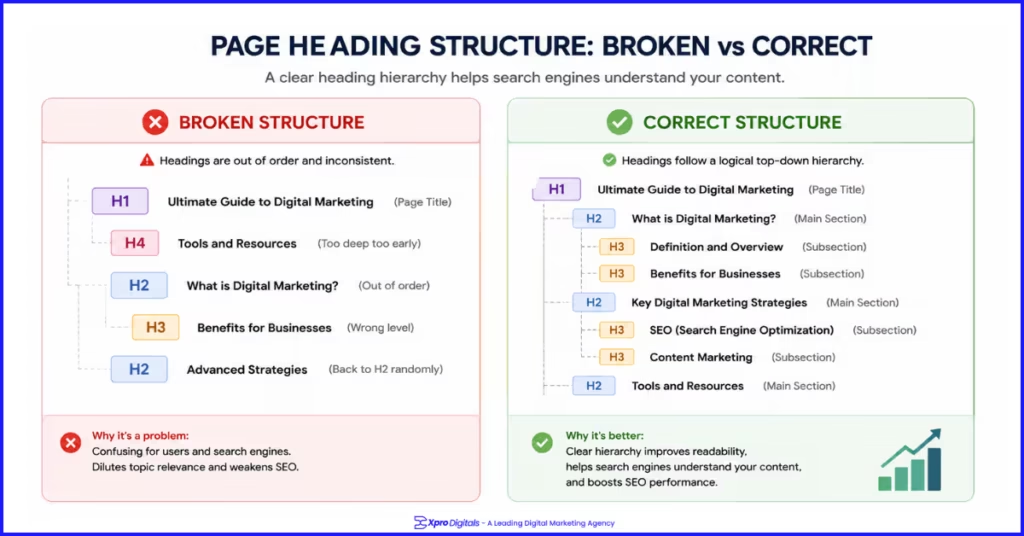
Your heading hierarchy is a content map for both readers and Google. It shows which topics are primary and which are secondary. A page with a clear H1 and well-organised H2 and H3 sections is significantly easier for Google to parse, extract answers from, and feature in rich results than a page with inconsistent or missing headings. One pattern we consistently see in on-page audits: businesses use H2 tags for visual formatting rather than structural content organisation. They bold a subheading, then apply H2 styling for visual weight rather than semantic meaning. This breaks the structural signal Google reads from the heading hierarchy.Heading Structure Checklist
| Check | Pass Criteria | Common Mistake | Done? |
| Single H1 per page | Exactly one H1 on the page | Multiple H1s, or H1 missing entirely | |
| H1 includes primary keyword | Keyword present in H1 naturally | H1 is generic, keyword absent | |
| H1 matches page topic | Clearly states what the page is about | H1 is a welcome message or brand name | |
| Logical H2 / H3 hierarchy | H2 for sections, H3 for subsections | Jumping from H1 to H4 | |
| No skipped heading levels | H1 > H2 > H3 sequence maintained | H1 followed directly by H3 | |
| Secondary keywords in H2s | Related terms in section headings naturally | All H2s are generic descriptors | |
| PAA questions used as headings | Question-format headings where relevant | No question headings despite FAQ content |
Section 5: Content Quality and Search Intent Checklist
Content quality is the most important and most frequently misunderstood on-page factor. Google’s Search Quality Evaluator Guidelines define high-quality content as content that serves the reader’s actual need completely, comes from a credible source, and demonstrates genuine expertise. Word count, keyword density, and readability scores are secondary to those three criteria. A case study from our client work: an online retailer had a category page targeting ‘mens waterproof hiking boots’ ranking position 14. The page had 120 words of generic category copy and no buying guidance. We added a 400-word buying guide section covering what to look for in waterproof hiking boots, key features explained plainly, and a comparison table of their top-selling styles. The page moved to position 3 within seven weeks without any new backlinks.Search Intent Alignment Checklist
| Check | Pass Criteria | Done? |
| Identify the dominant intent | Search keyword and review top 5 results for format pattern | |
| Match the dominant content format | If top results are guides, your page is a guide. If listicles, make a listicle. | |
| Cover the topic completely | Address all subtopics top competitors cover, plus any gaps | |
| Primary keyword in first 100 words | Keyword appears naturally within the opening paragraph | |
| Content serves the reader first | Every section adds value for the visitor, not just for the keyword | |
| No keyword stuffing | Primary keyword used only where it reads naturally | |
| Semantic keywords distributed throughout | Related terms, entities, and topic vocabulary used naturally |
E-E-A-T Content Quality Checklist
| E-E-A-T Signal | What to Include | Pass Criteria | Done? |
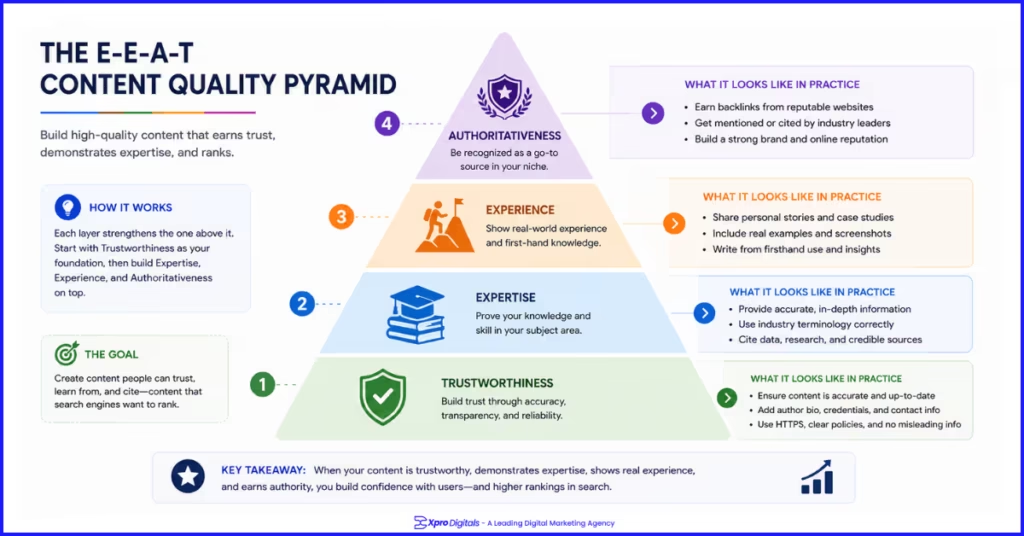
| Experience | First-hand observations, original data, client examples | At least one original example or data point per article | |
| Expertise | Accurate technical detail, depth beyond surface coverage | Covers subtopics competitors miss | |
| Authoritativeness | Author bio with credentials, external citations | Author bio visible, at least 2 external sources cited | |
| Trustworthiness | Accurate info, cited sources, updated content | No outdated statistics, sources linked |
Section 6: URL Structure Checklist
URL structure is a minor direct ranking signal but has meaningful effects on click-through rate, internal linking efficiency, and canonical management. A clean, keyword-relevant URL tells Google and the searcher what a page is about before they read a word of content. It also makes your internal linking strategy easier to manage as your site scales. The most common URL mistakes we see in on-page audits are parameter-heavy dynamic URLs that should be ranking pages, dates embedded in URLs that make content appear outdated, and long nested URLs that are four or five levels deep for pages that should be two clicks from the homepage.URL Structure Checklist
| Check | Pass Criteria | Common Mistake | Done? |
| Includes primary keyword | Keyword appears in URL slug | Auto-generated ID or number string | |
| Short and readable | Under 60 characters for the slug | Multiple subdirectories making URL very long | |
| Uses hyphens not underscores | Words separated by hyphens | Underscores between words | |
| All lowercase | No capital letters in URL | Mixed case causing duplicate URL issues | |
| No stop words | Removed ‘a’, ‘the’, ‘and’, ‘of’ where possible | Full article title including every word | |
| No date in URL | Evergreen URL without year or date | ‘/2026/03/on-page-seo/’ format | |
| No session or tracking parameters | Clean URL without ?utm= or ?sid= | Dynamic parameters in crawlable URLs |
Section 7: Image optimization Checklist
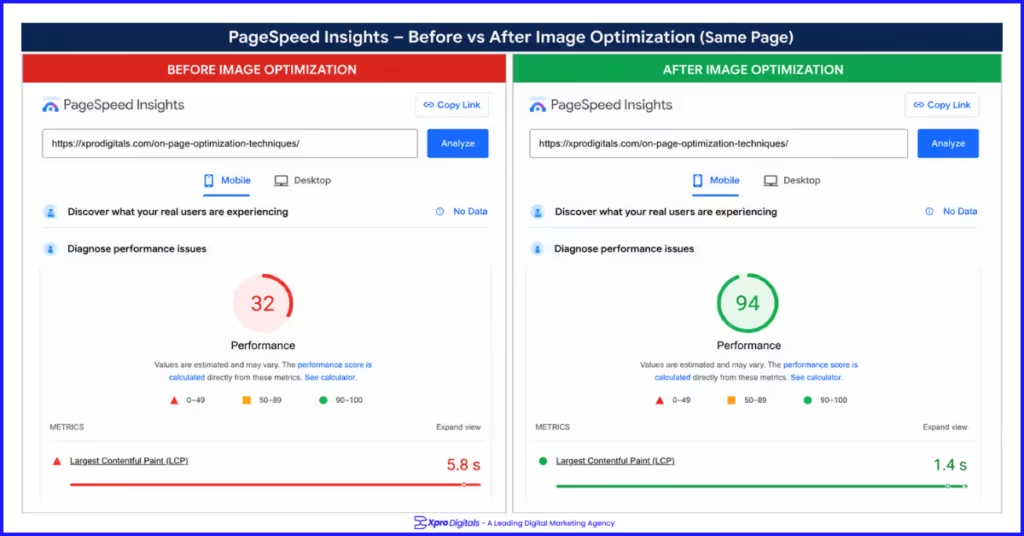
Images serve two simultaneous SEO functions. They are the primary cause of slow page load times, which fails Core Web Vitals and suppresses rankings. They are also an additional keyword relevance signal through file names and alt text, and a separate traffic source through Google Image Search. An ecommerce client we worked with had 47 product images on their homepage averaging 2.1MB each in JPEG format. Total image payload was 98MB. After converting to WebP, compressing to an average of 67KB, and adding explicit dimensions to all image tags, their LCP score on mobile improved from 8.2 seconds to 1.9 seconds. Organic traffic to the homepage increased 34% over the following two months.Image optimization Checklist
| Check | Pass Criteria | Tool | Done? |
| Descriptive file names | Hyphenated, keyword-relevant, no IMG_ strings | Rename before upload | |
| Alt text on every image | Describes image content, keyword used naturally | CMS alt text field | |
| Alt text not keyword-stuffed | Reads as a natural description | Manual review | |
| WebP format used | All photography in WebP, PNG only for transparency | Squoosh, ShortPixel, Imagify | |
| Images compressed | Under 150KB for most images without visible loss | Squoosh, TinyPNG | |
| Explicit width and height set | HTML img tag has both attributes defined | Theme or page builder settings | |
| Hero image NOT lazy loaded | No loading=’lazy’ on above-fold main image | View page source | |
| Hero image preloaded | fetchpriority=’high’ on main product/hero image | HTML attribute | |
| Below-fold images lazy loaded | loading=’lazy’ on all images below visible area | HTML attribute | |
| Decorative images have empty alt | Alt=” on purely decorative images | CMS alt text field |
Section 8: Internal Linking Checklist
Internal linking is one of the most underused on-page SEO levers available. Every internal link does three things: it passes authority from the linking page to the destination page, it signals the topical relationship between the two pages to Google, and it helps Googlebot discover and recrawl the destination page more efficiently. We audited the internal link structure of a B2B software client and found that their highest-converting service page had zero internal links pointing to it from any other page on the site. It existed as a completely orphaned page. After adding eight contextual internal links from related blog posts and the homepage, the page moved from position 22 to position 6 for its primary keyword within six weeks. No content changes were made.Internal Linking Checklist
| Check | Pass Criteria | Common Mistake | Done? |
| Page has inbound internal links | At least 2-3 pages linking to this page | Page is orphaned with no inbound links | |
| Outbound links to related pages | Links to 2-4 genuinely related pages | No outbound internal links from the page | |
| Descriptive anchor text used | Anchor text describes the destination page topic | Generic ‘click here’ or ‘read more’ anchor text | |
| Anchor text is varied | Different phrasing across multiple links to same page | Identical anchor text repeated on every link | |
| Links placed in body content | Links within paragraphs, not just navigation | All links in sidebar or footer only | |
| No broken internal links | All linked pages return 200 status | Links to deleted or redirected pages | |
| High-authority pages link to new pages | Homepage or top-ranked posts link to new content | New pages only linked from low-traffic pages |
Section 9: Schema Markup Checklist
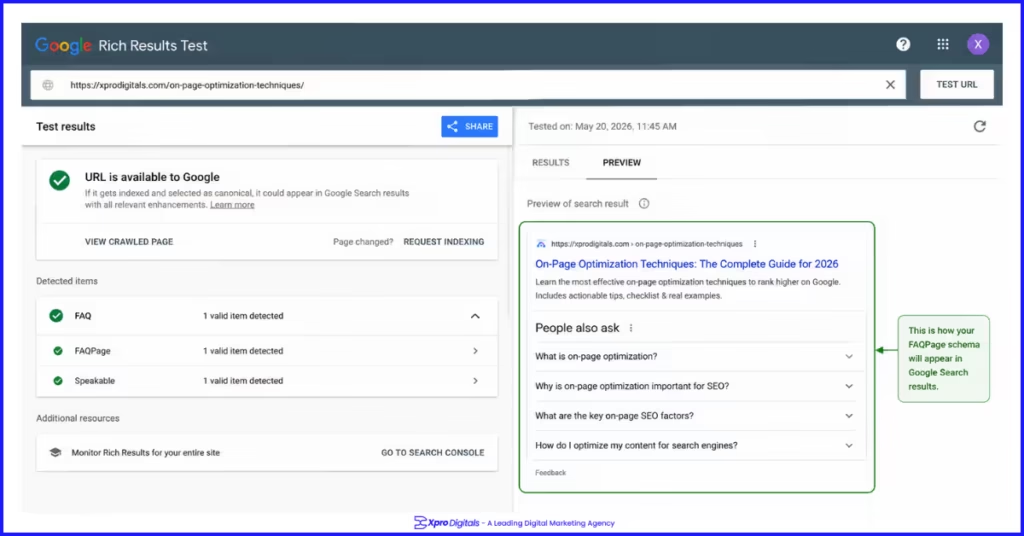
Schema markup is structured data in your page code that gives Google machine-readable context about your content. It does not directly improve rankings but enables rich results in search that increase the visual prominence of your listing. In a SERP where your result appears as a plain blue link next to competitors showing star ratings, FAQ expansions, and breadcrumb trails, you are losing clicks at the same ranking position. Google’s own data shows that rich results earn higher click-through rates than standard results for the same ranking position. FAQPage schema can expand your listing to occupy twice the vertical space on the SERP. Product schema with AggregateRating can display star ratings that increase buyer confidence before they even click.Schema Markup Checklist
| Check | Pass Criteria | Tool to Verify | Done? |
| Correct schema type applied | Schema type matches page content | Google Rich Results Test | |
| No errors in Rich Results Test | Zero errors shown in test | Google Rich Results Test | |
| No warnings in Rich Results Test | Warnings reviewed and addressed | Google Rich Results Test | |
| FAQPage schema on Q&A content | Applied to pages with question-answer sections | Rich Results Test | |
| Product schema on product pages | Name, description, image, SKU, offers included | Rich Results Test | |
| AggregateRating included | Rating value, count, and best/worst scale set | Rich Results Test | |
| BreadcrumbList on all pages | Reflects correct site hierarchy | Rich Results Test | |
| Schema matches visible content | Every schema property has matching visible text | Manual check + Rich Results Test | |
| No rich result penalties in GSC | Rich Results report shows no manual actions | Search Console Rich Results |
Section 10: Core Web Vitals and Page Experience Checklist
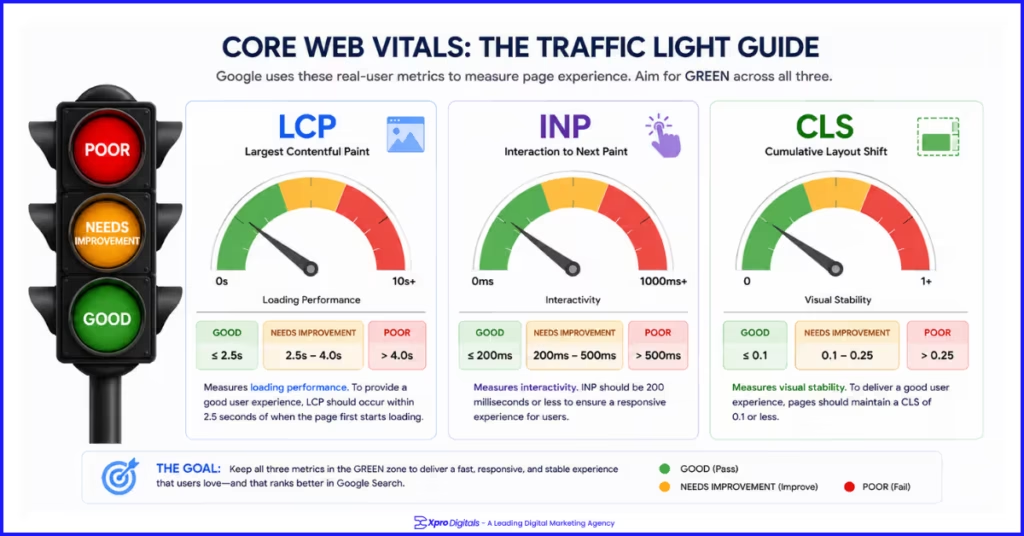
Page experience signals became a ranking factor with Google’s 2021 Core Web Vitals update and remain a competitive differentiator in 2026. A page with excellent content but failing Core Web Vitals will be outranked by a slightly less comprehensive page that delivers a fast, stable, responsive experience. Google has been explicit about this. The most common Core Web Vitals failures we see in on-page audits are LCP failures caused by unoptimized hero images, CLS failures caused by images loaded without explicit dimensions, and INP failures caused by excessive third-party JavaScript from marketing and analytics tools.Core Web Vitals Benchmarks
| Metric | Measures | Good | Needs Improvement | Poor | Most Common Cause |
| LCP | Largest content load time | Under 2.5s | 2.5s to 4s | Over 4s | Unoptimized hero image |
| INP | Response to user interaction | Under 200ms | 200ms to 500ms | Over 500ms | Heavy JavaScript |
| CLS | Visual layout stability | Under 0.1 | 0.1 to 0.25 | Over 0.25 | Images without dimensions |
Page Experience Checklist
| Check | Pass Criteria | Tool | Done? |
| LCP passes on mobile | Under 2.5 seconds on mobile test | PageSpeed Insights (mobile) | |
| INP passes on mobile | Under 200ms on mobile test | PageSpeed Insights (mobile) | |
| CLS passes on mobile | Under 0.1 on mobile test | PageSpeed Insights (mobile) | |
| Page served over HTTPS | Padlock visible, no mixed content warnings | Browser + SSL checker | |
| No intrusive interstitials | No full-screen pop-ups on mobile load | Manual mobile test | |
| Mobile-friendly text size | Readable without zooming, 16px+ base font | Google Mobile-Friendly Test | |
| Tap targets adequately sized | Buttons and links 48x48px minimum | Google Mobile-Friendly Test | |
| All content visible on mobile | No content hidden or truncated on small screens | Manual mobile device test |
The Master On-Page SEO Checklist: All 60 Checks in One Place
Use this consolidated checklist as your go-to audit reference for every page you publish or review. Mark each item as done as you work through it.
Step-by-Step: Running an On-Page SEO Audit in 60 Minutes
Minutes 1 to 10: Indexation and Technical Baseline
Open Google Search Console. Run URL Inspection on the page. Confirm it is indexed, check the canonical, note any crawl errors. If the page is not indexed, stop and fix that before anything else. A page that is not indexed cannot benefit from any other optimization.Minutes 11 to 20: Title, Meta, and Headings
Check the current title tag and meta description in the browser tab and in Search Console Performance. Is the keyword in the first half of the title? Is it under 60 characters? Open the page and use a headings extension to review the H1, H2, and H3 structure. Note every gap.Minutes 21 to 35: Content Quality Review
Search your target keyword in an incognito browser. Open the top three results. Compare their format, depth, and subtopics against your page. List every topic or section they cover that your page does not. These are your content gaps. Prioritise additions by how frequently they appear across the top results.Minutes 36 to 45: Images and Internal Links
Right-click each main image and check the file name and alt text in the page source. Run the page through PageSpeed Insights and check for image-related failures. Then check how many pages link to this one using Search Console’s Links report. Add links from relevant pages if the count is under two.Minutes 46 to 55: Schema Verification
Paste the URL into Google’s Rich Results Test. Check which schema types are detected. Fix any errors shown. If the page has Q&A content and no FAQPage schema, add it. If it is a product page without AggregateRating schema and reviews exist, add it.Minutes 56 to 60: Core Web Vitals
Run PageSpeed Insights on mobile. Note the LCP, INP, and CLS scores. If any are failing, identify the specific element causing the failure from the diagnostics panel. Schedule fixes based on severity and ranking impact of the page.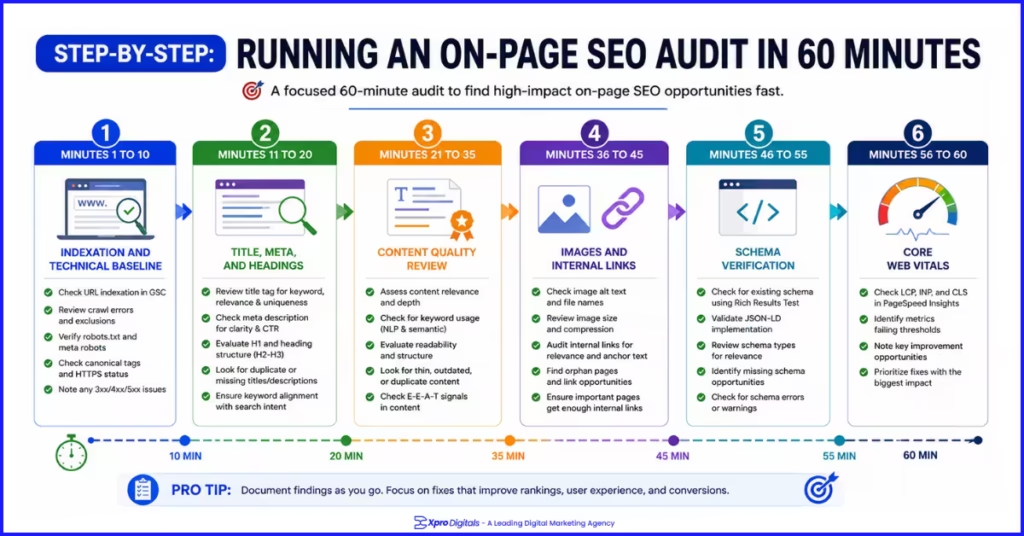
People Also Ask: On-Page SEO Checklist
What Should Be on an On-Page SEO Checklist?
A complete on-page SEO checklist should cover indexation status, title tag optimization, meta description, heading structure (H1, H2, H3), content quality and search intent match, keyword placement, URL structure, image optimization including alt text and file names, internal linking, schema markup, and Core Web Vitals on mobile. These are the elements that directly influence both ranking position and click-through rate.How Do I Do On-Page SEO Step by Step?
Start by confirming the page is correctly indexed. Then optimize the title tag and meta description. Review and improve the heading structure. Assess whether the content matches search intent and covers the topic completely. Add or fix image alt text and file names. Build internal links to and from the page. Implement relevant schema markup. Test Core Web Vitals on mobile. This sequence addresses the highest-impact elements first.What Is the Most Important On-Page SEO Factor?
Search intent alignment is the most important on-page factor in 2026. A page that mismatches the intent behind its target keyword will underrank regardless of how well every other element is optimized. Before writing or auditing any page, search the target keyword and confirm your content format matches what Google is already ranking for that query.How Do I Check My On-Page SEO?
Use Google Search Console for indexation status, click-through rate data, and Core Web Vitals field data. Use PageSpeed Insights for page speed and experience scores. Use the Google Rich Results Test for schema validation. Use a browser extension like Detailed SEO Extension or HeadingsMap to review meta tags and heading structure without viewing source code. Use Screaming Frog for site-wide on-page audits across multiple pages simultaneously.How Many Keywords Should I Use Per Page?
One primary keyword plus four to eight closely related semantic keywords is a practical target for most pages. Using the primary keyword only where it reads naturally and filling surrounding content with related entities and topical vocabulary is more effective than hitting a keyword density percentage. A page covering on-page SEO should naturally contain terms like title tags, meta descriptions, search intent, heading structure, and Core Web Vitals without forcing them in.Does Every Page Need Schema Markup?
Every indexed page should have at minimum BreadcrumbList schema and the content-type schema appropriate for its page type (Article, Product, LocalBusiness, etc.). FAQPage schema should be added to any page that includes question-and-answer sections. Product pages with customer reviews should have AggregateRating schema. Schema is not optional for pages that want to compete for the richest SERP presentations available in 2026.What Is the Difference Between On-Page SEO and Content SEO?
On-page SEO covers all elements within a page that influence rankings: title tags, headings, URL structure, schema markup, image optimization, internal links, and Core Web Vitals. Content SEO is a subset of on-page SEO that specifically focuses on the written content itself, including topic depth, search intent alignment, E-E-A-T signals, and keyword usage. You need both working together for a page to rank competitively.How Long Does On-Page SEO Take to Show Results?
On-page improvements to pages already ranking in positions 5 to 20 typically show ranking movement within four to eight weeks of being recrawled. Title tag and meta description changes can show CTR improvements within two to four weeks as Google updates its performance data. New pages targeting competitive keywords take three to six months to earn significant positions even with strong on-page optimization from day one.Can On-Page SEO Fix a Penalised Website?
On-page SEO alone cannot fix a Google penalty. Manual penalties require a reconsideration request after addressing the specific violation. Algorithmic penalties related to content quality, such as from the helpful content system, are addressed by improving content quality and E-E-A-T signals across the affected pages. On-page improvements are part of the recovery process but must be combined with addressing the root cause of the penalty.What Is Thin Content and How Do I Fix It on the Checklist?
Thin content refers to pages with very little original, useful information. This includes pages with only a few sentences, pages that repeat content from elsewhere on the site, and pages that do not serve any genuine searcher need. The fix is to either expand thin pages with genuinely useful, well-researched content that fully covers the topic, or to consolidate multiple thin pages into one comprehensive page using 301 redirects.Should I optimize Old Pages or Create New Ones?
Optimising existing pages with ranking history is almost always faster than creating new pages from scratch. A page ranking position 8 to 15 has already demonstrated enough relevance to compete. On-page improvements targeting its specific weaknesses (content gaps, weak title tag, missing schema) can push it to page one. New pages need to build that relevance from zero, which takes significantly more time.How Do I optimize a Page for Featured Snippets?
First, rank in the top ten for the target query. Then structure your answer as a concise, direct paragraph, numbered list, or table within a clearly labelled section. The section heading should match or closely reflect the query phrase. FAQPage schema supports featured snippet eligibility for question-format content. Keep your answer to 40 to 60 words for paragraph snippets and under 10 items for list snippets.What Tools Do I Need for an On-Page SEO Audit?
Google Search Console (free): indexation, CTR, Core Web Vitals. Google PageSpeed Insights (free): page speed and experience scores. Google Rich Results Test (free): schema validation. Detailed SEO Extension for Chrome (free): meta tags, headings, and link counts in browser. Screaming Frog (free up to 500 URLs): site-wide crawl and on-page analysis. These five tools cover the full on-page audit without paid subscriptions.How Do I optimize a Page for Multiple Keywords?
Target one primary keyword per page and support it with four to eight closely related semantic keywords that reflect different ways people search for the same topic. Never target multiple unrelated primary keywords on the same page. If two keywords have genuinely different intentions, they need separate pages. Attempting to target them together produces pages that are mediocre for both queries rather than excellent for either.What Happens if I Have Duplicate Meta Descriptions?
Duplicate meta descriptions across multiple pages are a missed opportunity and a sign of thin content management. Google may rewrite them with auto-generated snippets that underperform manually written versions. In Google Search Console, the Enhancements report surfaces duplicate meta descriptions. Prioritise writing unique meta descriptions for your highest-traffic pages first, then work through the rest systematically.