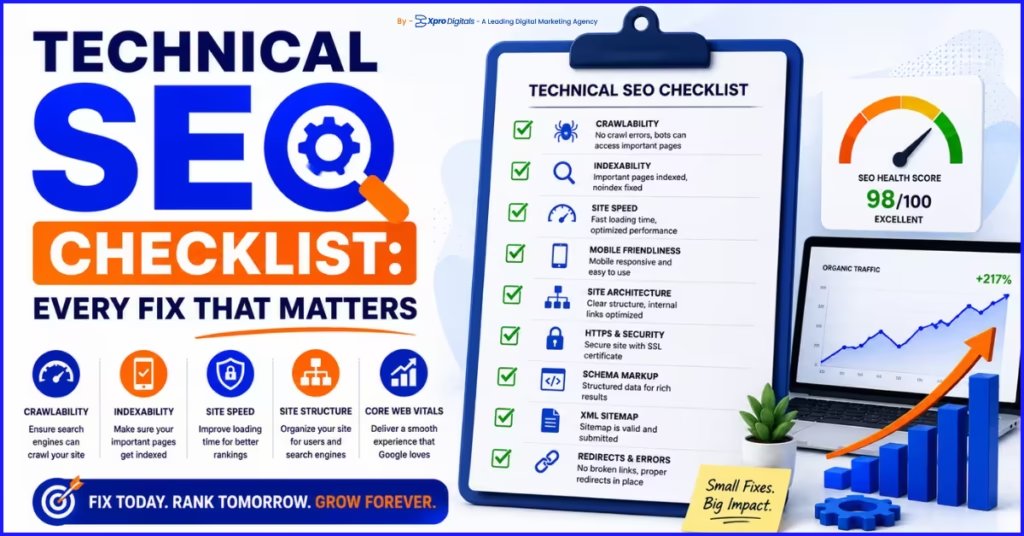
Technical SEO Checklist for 2026: Every Fix That Moves Rankings
Introduction: Why Technical SEO Problems Stay Hidden Until It Is Too Late
Here is the situation. You publish content consistently. Your keyword research is solid. You have earned some backlinks. But organic traffic barely moves. Rankings plateau. And nobody in your team can clearly explain why.
The uncomfortable answer is usually somewhere beneath the surface. Technical SEO problems are invisible in normal website use. You cannot see a misconfigured canonical tag by browsing your site. You cannot feel a crawl budget being wasted on filter combinations nobody searches for. You will not notice that 30% of your pages are accidentally no-indexed unless you specifically look for it.
The pain is significant because these invisible problems cap the return on every other SEO investment you make. Content that earns no clicks because it was never indexed. Links that pass authority to pages Google cannot crawl. Category pages that split ranking signals across duplicate filter-generated URLs. Every one of these technical issues is a drain on performance you cannot recover until you find and fix it.
This checklist covers every significant technical SEO factor that affects rankings in 2026. Each section includes what to check, what good looks like, what failing looks like, and the specific tool to use for each verification. By the end, you will have a complete audit framework that can be applied to any website, on any platform, at any size.
Technical SEO is the foundation that makes every other SEO investment worthwhile. For context on how it fits alongside on-page and off-page SEO, our guide on technical SEO vs on-page SEO: which matters more explains how each discipline connects and which to prioritise first.
How to Use This Checklist
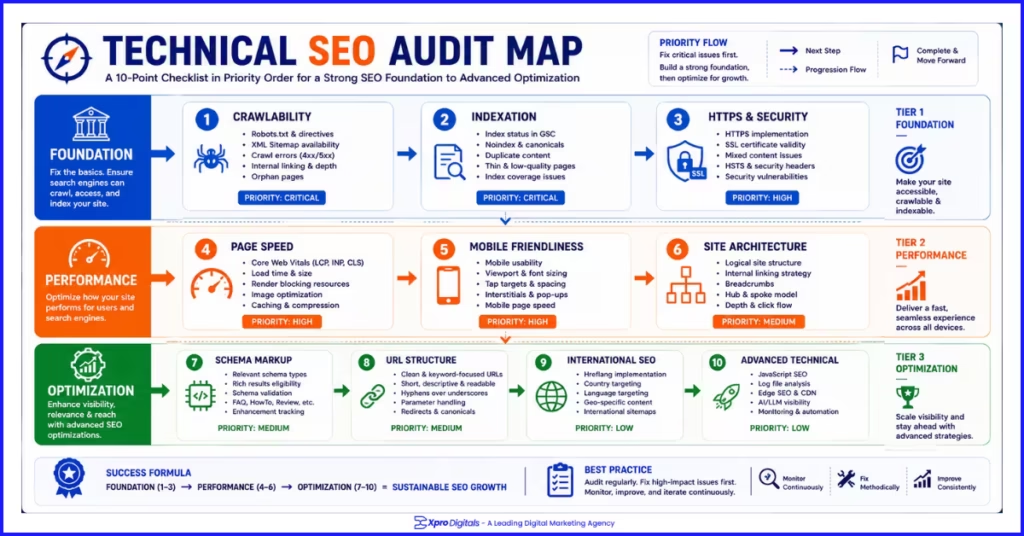
Work through each section in order. The sections are sequenced by priority: fix problems in earlier sections before investing time in later ones. A schema markup issue on a page that is not indexed is irrelevant. Fix the indexation problem first.
For each check, mark the status as Pass, Fail, or Not Applicable for your site. Document every failing item with the specific page or URL affected. Prioritise fixes by impact: issues affecting your highest-traffic or highest-revenue pages come before issues affecting low-traffic pages.
Run this checklist on a full site crawl, not a sample. Many technical SEO problems are invisible unless you look at the full picture. Screaming Frog, Sitebulb, or a similar crawl tool gives you the data for the majority of checks in this guide. Google Search Console provides the field data that crawl tools cannot capture.
Section 1: Crawlability Checklist
Crawlability determines whether Googlebot can access your pages. If a page cannot be crawled, it cannot be indexed, and if it cannot be indexed, it cannot rank. This section is the absolute foundation of technical SEO. Fix everything here before moving to any other section.
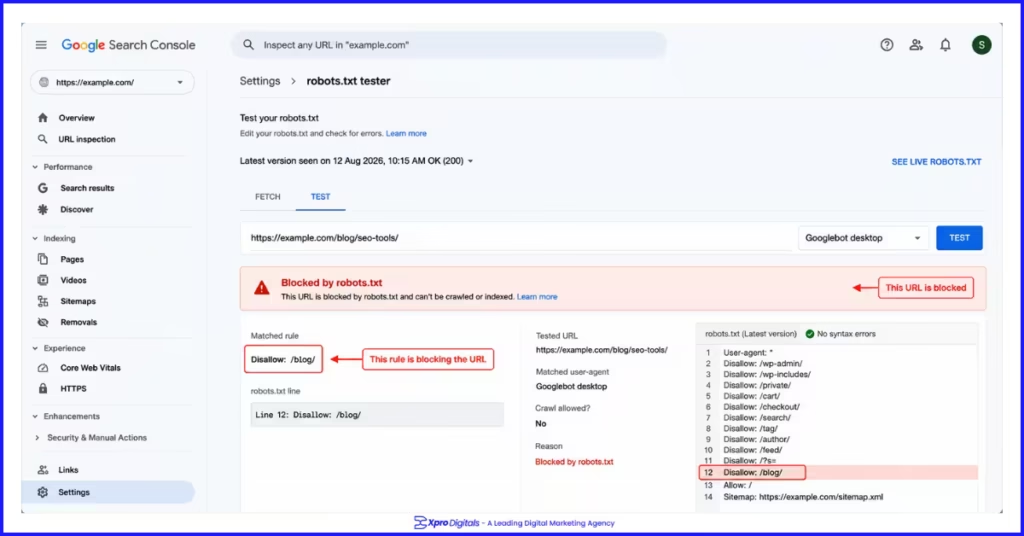
We audited a B2B software company that had published 80 pages of thought leadership content over 14 months with almost zero organic traction. A crawl revealed their blog directory was blocked in robots.txt from a staging environment configuration that had been carried into production. Every page was crawlable only by humans who typed the URL directly. Googlebot never saw any of them. The fix took 20 minutes. Organic traffic to the blog grew 380% over the following eight weeks.
Crawlability Checks
| Check | What Good Looks Like | What Failing Looks Like | Tool | Done? |
| Robots.txt accessible | Returns 200 status, readable format | Returns 404 or blocks Googlebot | Browser URL check | |
| Robots.txt not blocking key pages | No Disallow rules on indexable directories | Disallow: / or blocks product, blog, or category paths | GSC robots.txt tester | |
| XML sitemap submitted to GSC | Sitemap submitted, no errors shown | Not submitted, or returns errors in GSC Sitemaps report | Google Search Console | |
| XML sitemap contains only live, canonical pages | All URLs in sitemap return 200 and are self-canonical | Sitemap includes 301 redirected or no-index URLs | Screaming Frog sitemap audit | |
| No crawl errors on key pages | Zero 4xx or 5xx responses on important pages | 404 or 500 errors on pages with internal links | GSC Coverage Report | |
| Internal links are crawlable | All links use standard HTML href attributes | Links in JavaScript or behind forms Googlebot cannot execute | Screaming Frog crawl | |
| No redirect chains longer than one hop | All redirects go directly to final destination | Chain of 3+ redirects from old to final URL | Screaming Frog redirect audit | |
| No broken internal links (404) | All internal links return 200 status | Linked pages return 404 | Screaming Frog, Ahrefs |
Section 2: Indexation Checklist
Indexation determines whether Google adds your crawled pages to its search index. A crawled page is not automatically indexed. Google evaluates quality and decides whether the page deserves a place in the index. Pages blocked by no-index tags, assessed as thin content, or generating duplicate content signals may be crawled but not indexed.
Indexation problems are frequently invisible. The most common one we encounter in audits is a no-index meta tag that was applied during a website build or development phase and never removed.
One ecommerce client had 3,400 product pages set to no-index because a developer had applied a blanket no-index during a template rebuild and the team had not noticed.
None of those pages appeared in search results. Removing the no-index directive indexed the pages over the following six weeks and generated 180% organic traffic growth.
Indexation Checks
| Check | What Good Looks Like | What Failing Looks Like | Tool | Done? |
| All key pages indexed | GSC Coverage shows URL as indexed | URL shows as excluded with reason listed | GSC URL Inspection | |
| No accidental no-index on published pages | No no-index in meta robots tag on key pages | ‘no-index’ present in head section on ranking pages | Screaming Frog, browser view-source | |
| x-robots-tag header not blocking pages | No no-index in HTTP response header | Server-level no-index blocking entire directories | Screaming Frog response headers | |
| GSC Coverage exclusion reasons reviewed | Zero unexpected exclusions in Coverage Report | Large number of ‘Excluded by no-index’ or ‘Crawled, not indexed’ | Google Search Console | |
| Crawled but not indexed pages investigated | All crawled pages indexed or intentionally excluded | High number of ‘Crawled, not currently indexed’ pages | Google Search Console | |
| Thin content pages addressed | All indexed pages have sufficient original content | Pages with under 200 words and no media indexed | Screaming Frog word count filter | |
| Duplicate pages resolved | Single canonical version of each page indexed | Multiple near-identical pages competing in index | Siteliner, Screaming Frog | |
| Orphaned pages linked internally | Every indexed page has at least one internal link | Pages in sitemap with no inbound internal links | Screaming Frog crawl vs sitemap comparison |
Section 3: HTTPS and Security Checklist
HTTPS is a confirmed Google ranking signal and a baseline trust requirement. In 2026, any page served over HTTP is flagged as not secure in browsers, which directly undermines visitor trust at the point of conversion. The technical SEO impact of HTTPS goes beyond the direct ranking signal to include the trust signals that affect engagement metrics Google uses to evaluate page quality.
HTTPS and Security Checks
| Check | What Good Looks Like | What Failing Looks Like | Tool | Done? |
| All pages served over HTTPS | Padlock visible, no HTTP pages accessible | HTTP version accessible without redirect | Browser check on HTTP URL | |
| SSL certificate valid and not expiring | Certificate valid, not within 30 days of expiry | Certificate expired or flagged as invalid | SSL checker tool (sslshopper.com) | |
| No mixed content errors | All page assets load over HTTPS | Images, scripts, or CSS loading over HTTP on HTTPS page | Browser console, Screaming Frog | |
| HTTP redirects to HTTPS | All HTTP URLs 301 redirect to HTTPS equivalent | HTTP pages accessible without redirect | Screaming Frog redirect check | |
| www and non-www redirect consistent | One version redirects to the other, consistently | Both www and non-www accessible simultaneously | Browser check on both versions | |
| HSTS header implemented | Strict-Transport-Security header present in response | No HSTS header (not critical but recommended) | Screaming Frog response headers |
Section 4: Core Web Vitals and Page Speed Checklist
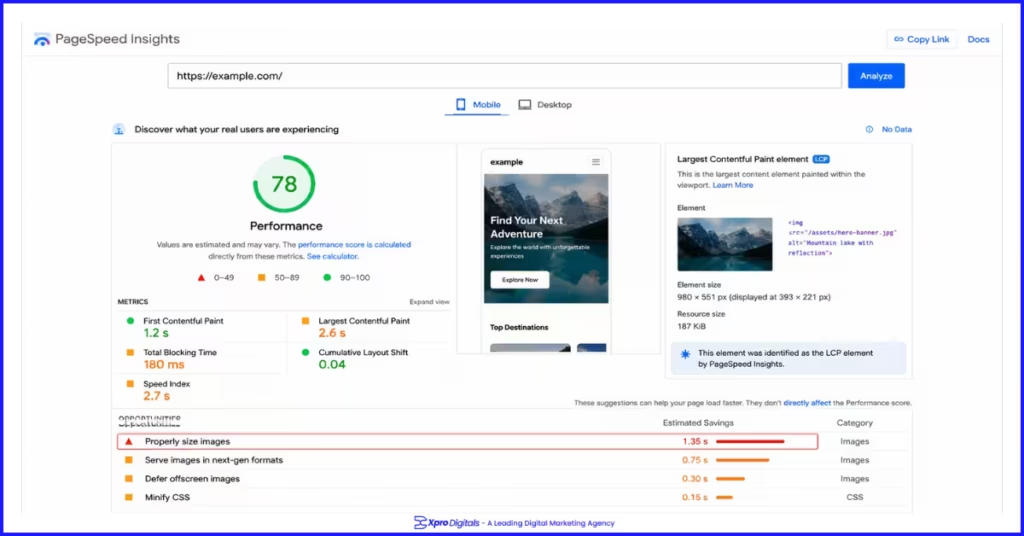
Core Web Vitals are Google’s page experience metrics and a confirmed ranking signal. Pages that fail LCP, INP, or CLS benchmarks receive a page experience penalty relative to equally relevant pages that pass.
For ecommerce stores and content sites competing in contested markets, failing Core Web Vitals creates a structural ranking disadvantage that worsens as competitors improve their scores.
An ecommerce client we audited had a homepage LCP of 8.4 seconds on mobile caused by a 3.2MB hero image served as uncompressed JPEG. Their mobile conversion rate was 0.6% versus 2.4% on desktop.
After converting the hero image to WebP at 180KB and adding fetchpriority=’high’ to the image tag, mobile LCP dropped to 1.7 seconds. Mobile conversion rate improved to 1.8% over the following six weeks and their page one ranking for the homepage primary keyword moved from position 9 to position 4.
Core Web Vitals Benchmarks
| Metric | Good | Needs Improvement | Poor | Most Common Cause |
| LCP (Largest Contentful Paint) | Under 2.5s | 2.5s to 4s | Over 4s | Unoptimised hero image |
| INP (Interaction to Next Paint) | Under 200ms | 200ms to 500ms | Over 500ms | Heavy JavaScript execution |
| CLS (Cumulative Layout Shift) | Under 0.1 | 0.1 to 0.25 | Over 0.25 | Images without explicit dimensions |
Page Speed and Core Web Vitals Checks
| Check | What Good Looks Like | What Failing Looks Like | Tool | Done? |
| LCP passes on mobile | Under 2.5 seconds on mobile PageSpeed test | LCP over 4 seconds on mobile | PageSpeed Insights (mobile tab) | |
| INP passes on mobile | Under 200ms on mobile | INP over 500ms on mobile | PageSpeed Insights (mobile tab) | |
| CLS passes on mobile | Under 0.1 on mobile | CLS over 0.25 on mobile | PageSpeed Insights (mobile tab) | |
| Images in WebP format | All photography served as WebP | JPEG or PNG used for large photography | Screaming Frog image audit | |
| Images compressed under 150KB average | Product and hero images under 150KB | Images over 500KB on any key page | PageSpeed Insights Opportunities | |
| Explicit width/height on all images | All img tags have width and height attributes | Images without dimensions causing layout shift | Screaming Frog, PageSpeed Insights | |
| Hero image not lazy loaded | No loading=’lazy’ on above-fold main image | Hero/LCP image has lazy loading applied | View page source | |
| Hero image has fetchpriority=high | fetchpriority=’high’ on main above-fold image | No priority hint on above-fold image | View page source | |
| Non-critical JavaScript deferred | Scripts use defer or async attributes | Render-blocking scripts in head section | PageSpeed Insights Opportunities | |
| Server response time (TTFB) under 600ms | First byte received in under 600ms | TTFB over 1.5 seconds consistently | PageSpeed Insights, GTmetrix | |
| Caching headers configured | Cache-Control headers set for static assets | No caching, assets downloaded fresh every visit | Screaming Frog response headers |
For ecommerce stores where product images directly affect both Core Web Vitals and conversion rates, image optimization is the single highest-impact technical improvement in most audits.
Our ecommerce Core Web Vitals optimisation guide covers LCP, INP, and CLS fixes specifically for product and category pages with platform-specific instructions.
Section 5: Mobile SEO Checklist
Google uses mobile-first indexing for every website. The mobile version of your site is what Google primarily evaluates for ranking. A site with a strong desktop experience and a poor mobile experience is ranked on its weakest version. This makes mobile optimisation a ranking prerequisite, not a secondary consideration.
Mobile SEO Checks
| Check | What Good Looks Like | What Failing Looks Like | Tool | Done? |
| Site passes mobile-friendly test | Google tool shows ‘Page is mobile-friendly’ | Mobile usability errors reported | Google Mobile-Friendly Test | |
| No mobile usability errors in GSC | Zero issues in GSC Mobile Usability report | Errors shown for text too small, tap targets, viewport | Google Search Console | |
| Viewport meta tag present | meta name=’viewport’ in head section | Missing viewport tag causing desktop rendering on mobile | View page source | |
| Text readable without zooming | Base font size 16px or larger | Text under 12px requiring pinch-zoom on mobile | Manual mobile device test | |
| Tap targets adequately sized | Interactive elements 48x48px minimum with spacing | Buttons or links too small or too close together | Google Mobile-Friendly Test | |
| No content hidden on mobile | All content accessible without expansion on mobile | Key content hidden in collapsed tabs not readable by Google | Manual mobile device test | |
| No intrusive interstitials on mobile load | No full-screen pop-up covering content on mobile | Interstitial covering main content on page load | Manual mobile device test | |
| Mobile Core Web Vitals pass specifically | LCP, INP, CLS all pass on mobile tab of PageSpeed | Desktop passes but mobile fails Core Web Vitals | PageSpeed Insights mobile tab |
Section 6: Site Architecture Checklist
Site architecture determines how efficiently Google can crawl your pages and how authority flows between them. A flat architecture where every important page is reachable within three to four clicks from the homepage is the technical standard for crawl efficiency. Pages buried deeper receive less crawl attention and accumulate less internal authority.
Site Architecture Checks
| Check | What Good Looks Like | What Failing Looks Like | Tool | Done? |
| Key pages within 3-4 clicks of homepage | Max crawl depth of 4 for important pages | Product or category pages at depth 7 or deeper | Screaming Frog crawl depth report | |
| No orphaned pages | Every important page has at least one internal link | Pages in sitemap with zero inbound internal links | Screaming Frog crawl vs sitemap | |
| Navigation links are crawlable | Main navigation uses standard HTML links | Navigation rendered entirely via JavaScript | View page source, Screaming Frog | |
| Breadcrumbs implemented | Breadcrumb trail on all category and product pages | No breadcrumbs, only homepage navigation available | Manual check on key page types | |
| Pagination handled correctly | Paginated pages use rel=canonical or are indexed with clear URL pattern | Paginated pages creating duplicate content | Screaming Frog pagination audit | |
| Faceted navigation controlled | Filter combinations no-indexed or canonicalised to base category | Thousands of filter URLs in Google’s index | GSC Coverage, Screaming Frog | |
| URL parameters managed | Parameters excluded in GSC or via canonical tags | Parameter variations indexed as unique pages | GSC Legacy Tools URL Parameters | |
| Internal anchor text is descriptive | Links use keyword-relevant descriptive text | Most internal links use ‘click here’ or ‘read more’ | Screaming Frog anchor text report |
For ecommerce stores, faceted navigation is the most damaging site architecture issue at scale. It can generate thousands of thin, near-duplicate URLs that consume crawl budgets and dilute category page authority.
Our guide on faceted navigation SEO and managing crawl budget covers how to audit and control filter-generated URLs across Shopify and WooCommerce stores.
Section 7: Canonical Tags and Duplicate Content Checklist
Canonical tags tell Google which version of a page is the preferred version for indexing. Without correct canonicalisation, duplicate content issues split ranking signals between multiple URL versions, meaning none of them rank as strongly as a single consolidated page would. Duplicate content in ecommerce stores is among the most common and most damaging technical SEO problems at scale.
Canonical Tag and Duplicate Content Checks
| Check | What Good Looks Like | What Failing Looks Like | Tool | Done? |
| Every page has a canonical tag | rel=canonical present in head section on all pages | Pages without canonical, especially in ecommerce | Screaming Frog canonical audit | |
| Canonical tags are self-referencing on canonical pages | Canonical URL matches the page’s own URL | Canonical points to a different page unintentionally | Screaming Frog canonical report | |
| Product variant URLs canonicalised | All colour/size variants canonical to main product URL | Each variant accessible as separate indexed page | Screaming Frog crawl | |
| Paginated pages have correct canonicals | Page 2+ canonicals to page 1 or self-canonical with indexable pagination | All paginated pages self-canonical without handling | Screaming Frog pagination audit | |
| No cross-domain canonical issues | Canonicals do not point outside your domain unintentionally | Third-party pages accidentally set as canonical | Screaming Frog canonical report | |
| www and non-www canonical consistent | One version canonical to the preferred version | Both versions self-canonical simultaneously | Screaming Frog | |
| HTTP version canonical to HTTPS | HTTP pages either redirect or canonical to HTTPS | HTTP pages with self-canonical to HTTP | Screaming Frog | |
| No duplicate title tags | Every page has a unique title tag | Multiple pages with identical title tags | Screaming Frog title tag audit | |
| No duplicate meta descriptions | Every page has a unique meta description | Identical meta descriptions across multiple pages | Screaming Frog meta description report |
Section 8: Schema Markup and Structured Data Checklist
Schema markup gives Google machine-readable context about your page content. It enables rich results in search that increase your listing’s visual prominence and click-through rate. In 2026, schema is not optional for pages competing in markets where competitors display star ratings, FAQ expansions, and breadcrumb trails directly in search listings.
Schema Markup Checks
| Check | What Good Looks Like | What Failing Looks Like | Tool | Done? |
| Correct schema type applied per page | Article for posts, Product for products, LocalBusiness for location pages | Wrong schema type or no schema on key pages | Google Rich Results Test | |
| No schema errors in Rich Results Test | Zero errors in validation tool | Required properties missing or incorrect format | Google Rich Results Test | |
| Schema matches visible page content | Every schema property has matching visible text on page | Schema includes data not displayed on the page | Manual comparison + Rich Results Test | |
| Product schema includes all required fields | Name, image, description, offers, SKU, brand all present | Missing price, currency, or availability in Offer object | Google Rich Results Test | |
| AggregateRating schema where reviews exist | Rating value, review count, and scale present | Review stars absent despite customer reviews on page | Google Rich Results Test | |
| FAQPage schema on Q&A content | Question and answer pairs marked up correctly | FAQ content on page but no schema implemented | Google Rich Results Test | |
| BreadcrumbList schema on category and product pages | Full hierarchy marked up matching visible breadcrumbs | Breadcrumbs visible but not in structured data | Google Rich Results Test | |
| No rich result penalties in GSC | Rich Results report shows no manual actions | Manual action reported in GSC for structured data | Google Search Console |
Implementing the full schema stack for ecommerce pages, including Product, Offer, AggregateRating, and BreadcrumbList, is one of the highest-impact technical improvements available for online stores.
Our ecommerce schema markup implementation guide provides working code examples for every schema type with validation steps.
Section 9: URL Structure Checklist
URL structure is a minor direct ranking signal but has meaningful indirect effects on click-through rate, internal linking efficiency, and canonicalisation management. Clean, descriptive, consistent URLs are also significantly easier to manage at scale than auto-generated parameter-heavy URLs that change with each dynamic page render.
URL Structure Checks
| Check | What Good Looks Like | What Failing Looks Like | Tool | Done? |
| URLs are lowercase throughout | All characters in URL path are lowercase | Mixed case creating duplicate URL versions | Screaming Frog | |
| URLs use hyphens not underscores | Words separated by hyphens in URL | Underscores used between words | Screaming Frog URL report | |
| URLs are short and descriptive | Slug describes page topic clearly | Auto-generated IDs or excessive subdirectory depth | Screaming Frog URL report | |
| No tracking parameters in canonical URLs | Clean URLs without utm_ or session parameters | Parameter-laden URLs indexed as separate pages | GSC Coverage, Screaming Frog | |
| URL structure is consistent across site | Same format used across all pages of each type | Inconsistent subdirectory or naming conventions | Screaming Frog URL analysis | |
| No date in URL for evergreen content | Evergreen content URLs have no year or date | /2019/blog-post-title/ for pages expected to rank long-term | Screaming Frog URL filter |
Section 10: Crawl Budget Checklist
Crawl budget is the number of pages Googlebot will crawl on your site within a given timeframe. For small sites, this is rarely a concern. For large ecommerce stores with thousands of product pages, crawl budget becomes a genuine ranking constraint.
If Google spends its crawl allocation on low-value filter URLs and paginated views, it may never reach or regularly recrawl your most important product pages.
Crawl Budget Checks
| Check | What Good Looks Like | What Failing Looks Like | Tool | Done? |
| Crawl stats in GSC reviewed | Crawl request volume stable or growing, no anomalies | Sudden crawl rate drop or crawl anomalies reported | GSC Crawl Stats report | |
| Faceted navigation URLs controlled | Filter combinations blocked or canonicalised | Thousands of filter URLs consuming crawl allocation | Screaming Frog, GSC Coverage | |
| Session IDs not creating unique URLs | Session parameters excluded from crawl | Each visitor session generating unique indexed URL | Screaming Frog, GSC URL Parameters | |
| Infinite scroll handled correctly | Paginated URLs generated for crawlers, not just JS scroll | Content only accessible via JavaScript infinite scroll | Screaming Frog JavaScript rendering | |
| Log file analysis conducted | Googlebot crawling priority pages frequently | Googlebot spending crawl on 404s and parameter URLs | Log file analyser (Screaming Frog, Splunk) | |
| Thin or low-value pages no-indexed | Pages with no ranking purpose excluded from index | Large volume of thin auto-generated pages indexed | Screaming Frog word count + index check |
Section 11: International and Hreflang Checklist
This section applies only to sites targeting multiple countries or languages. Skip it if your site has a single-market, single-language audience.
International SEO Checks
| Check | What Good Looks Like | What Failing Looks Like | Tool | Done? |
| Hreflang tags on all international pages | Every language/country version tagged | Some pages missing hreflang tags in the set | Hreflang validator, Screaming Frog | |
| Self-referencing hreflang on every page | Page’s own URL included in its hreflang set | Self-reference missing from hreflang implementation | Hreflang validator | |
| Return tags present on all referenced pages | Every referenced page has matching return tag | Pages referenced but not reciprocating | Hreflang validator | |
| x-default tag implemented | Fallback hreflang present on all pages | No x-default, unmatched users get default language page | Hreflang validator | |
| Valid language and country codes used | BCP 47 codes used (en-GB, de-DE, fr-FR) | Invalid or invented codes used | Hreflang validator | |
| Geotargeting set in GSC | Country target set for each international subdirectory | No geotargeting configured for subdirectory versions | GSC International Targeting | |
| No hreflang on no-indexed pages | No-indexed pages have no hreflang tags | Hreflang on pages also marked no-index | Screaming Frog combined report |
For the full framework on international URL structure decisions, hreflang implementation, and market-specific SEO strategy, our guide on what international SEO is and how it works covers every technical and strategic element of expanding your organic presence across multiple markets.
Section 12: Platform-Specific Technical Checks
Shopify Technical SEO Checks
| Shopify-Specific Check | What to Verify | Common Issue | Done? |
| Product collection duplicate URLs | Products in multiple collections have canonical to preferred URL | Google indexes /collections/all/products/item separately from /products/item | |
| robots.txt customisation | Custom robots.txt reflects your crawl requirements | Default Shopify robots.txt blocking sections unnecessarily | |
| Theme code adds correct canonical | Canonical tag in theme head section is correct | Theme generating incorrect canonical on collection pages | |
| App JavaScript deferred | Third-party app scripts loaded asynchronously | Multiple app scripts blocking page render | |
| Shopify CDN used correctly | Product images served from Shopify CDN | Images served from slow external sources |
Shopify introduces platform-specific technical constraints that generalist SEO audits frequently miss.
Our Shopify technical SEO checklist covers every Shopify-specific issue with fix instructions for each.
WordPress Technical SEO Checks
| WordPress-Specific Check | What to Verify | Common Issue | Done? |
| SEO plugin configured correctly | Yoast SEO or Rank Math settings verified | Default plugin settings leaving gaps in canonical or sitemap configuration | |
| No plugin conflicts causing errors | Site functions without JavaScript errors in console | Conflicting plugins causing 404s or broken functionality | |
| Caching plugin active | Page caching reducing TTFB to under 600ms | No caching, PHP executing fresh on every request | |
| Database optimised | Query times acceptable, no slow query alerts | Database bloat causing slow server response | |
| Image compression plugin active | Images auto-compressed on upload | Full-resolution images served without compression |
The Master Technical SEO Checklist: All Checks in One Place
| Section | Check | Status |
| 1. Crawlability | Robots.txt not blocking key pages | |
| 1. Crawlability | XML sitemap submitted and error-free | |
| 1. Crawlability | No crawl errors on key pages | |
| 1. Crawlability | No redirect chains longer than one hop | |
| 1. Crawlability | No broken internal links | |
| 2. Indexation | All key pages indexed in GSC | |
| 2. Indexation | No accidental no-index on published pages | |
| 2. Indexation | Crawled but not indexed pages investigated | |
| 2. Indexation | No orphaned pages | |
| 3. HTTPS | All pages served over HTTPS | |
| 3. HTTPS | SSL certificate valid | |
| 3. HTTPS | No mixed content errors | |
| 4. Core Web Vitals | LCP passes on mobile | |
| 4. Core Web Vitals | INP passes on mobile | |
| 4. Core Web Vitals | CLS passes on mobile | |
| 4. Core Web Vitals | Images in WebP, under 150KB average | |
| 4. Core Web Vitals | Hero image not lazy loaded, fetchpriority set | |
| 5. Mobile | No mobile usability errors in GSC | |
| 5. Mobile | Tap targets 48px minimum | |
| 5. Mobile | No intrusive interstitials on mobile | |
| 6. Architecture | Key pages within 3-4 clicks of homepage | |
| 6. Architecture | No orphaned pages without internal links | |
| 6. Architecture | Faceted navigation URLs controlled | |
| 7. Canonical/Duplicate | Every page has a canonical tag | |
| 7. Canonical/Duplicate | Product variants canonicalised | |
| 7. Canonical/Duplicate | No duplicate title tags | |
| 8. Schema | Correct schema type applied | |
| 8. Schema | No schema errors in Rich Results Test | |
| 8. Schema | Schema matches visible content | |
| 9. URL Structure | URLs lowercase, hyphens, no parameters | |
| 9. URL Structure | No dates in evergreen content URLs | |
| 10. Crawl Budget | Faceted navigation controlled | |
| 10. Crawl Budget | Thin pages no-indexed or removed | |
| 11. International | Hreflang with self-reference and return tags | |
| 11. International | x-default tag on all international pages | |
| 11. International | GSC geotargeting configured |
Step-by-Step: How to Run a Technical SEO Audit in One Day
Morning: Crawl and Indexation (2-3 Hours)
Start Screaming Frog and crawl your full site. While it runs, open Google Search Console and review the Coverage report for exclusion reasons, the Core Web Vitals report for failing pages, and the Crawl Stats for any anomalies.
When the crawl completes, export results and filter for: crawl errors, no-index pages, missing title tags, duplicate titles, pages with no inbound internal links, and redirect chains. Note all failing items with the specific URLs affected.
Late Morning: Technical Analysis (1-2 Hours)
Review the Screaming Frog canonical report for any pages pointing to incorrect canonical URLs. Check the response headers for any pages with x-robots-tag no-index.
Test your robots.txt in the GSC robots.txt tester. Check your XML sitemap in the GSC Sitemaps report for errors. Run five to ten key pages through the Rich Results Test to check schema implementation and errors.
Early Afternoon: Performance Checks (1-2 Hours)
Run your five most important page types (homepage, category, product, blog, contact) through Google PageSpeed Insights on mobile. Record LCP, INP, and CLS scores for each.
Note every failing metric and the specific opportunity or diagnostic that explains the cause. Run the same pages through the Mobile-Friendly Test and note any usability errors.
Late Afternoon: Prioritise and Document (1 Hour)
Compile all failing items from the morning crawl and afternoon performance checks into a single prioritised list. Order by impact: indexation and crawlability issues first, then Core Web Vitals failures on high-traffic pages, then schema errors, then URL structure issues.
Document the specific fix for each item. Assign ownership to the person or team responsible for each fix category.
People Also Ask: Technical SEO Checklist
What Is a Technical SEO Audit?
A technical SEO audit is a systematic review of your website’s infrastructure to identify problems that prevent Google from efficiently crawling, indexing, and ranking your pages. It covers crawlability, indexation, page speed, mobile usability, site architecture, canonical tags, structured data, and URL structure. The output is a prioritised list of specific fixes that will improve organic search performance.
How Often Should I Run a Technical SEO Audit?
Run a full technical audit quarterly as a baseline, plus immediately after any significant site change such as a platform migration, theme update, major content restructure, or plugin installation.
Technical regressions frequently occur after site changes that seem unrelated to SEO. Monthly monitoring through Google Search Console alerts catches new issues between full audits before they compound into larger problems.
What Tools Do I Need for a Technical SEO Audit?
- Google Search Console (free): indexation, Core Web Vitals field data, crawl stats, coverage errors.
- Screaming Frog (free up to 500 URLs, paid beyond): full site crawl and analysis.
- Google PageSpeed Insights (free): Core Web Vitals and performance diagnostics.
- Google Rich Results Test (free): schema markup validation.
- Google Mobile-Friendly Test (free): mobile usability check.
These five tools cover the majority of technical audit checks without requiring paid subscriptions beyond Screaming Frog for larger sites.
What Are the Most Important Technical SEO Factors in 2026?
- Crawlability and correct indexation are the foundational factors: pages that cannot be crawled or indexed cannot rank regardless of any other signal.
- Core Web Vitals passing on mobile is the most impactful performance factor.
- Correct canonical tag implementation on ecommerce stores prevents the duplicate content issues that most commonly suppress product and category rankings.
- Schema markup enabling rich results improves click-through rate from the same ranking position.
These four areas deliver the most consistent ranking impact across site types.
What Is a Crawl Budget and Does My Site Need to Worry About It?
Crawl budget is the number of pages Googlebot will crawl on your site within a given timeframe. For sites under 1,000 pages with clean architecture, crawl budget is rarely a constraint.
For ecommerce stores with thousands of product pages, filter combinations, and paginated views, crawl budget management becomes important. The primary fix is controlling which URLs Googlebot accesses through robots.txt, canonical tags, and no-index directives on low-value pages.
How Do I Fix Core Web Vitals on My Website?
Identify which specific metric is failing (LCP, INP, or CLS) using Google PageSpeed Insights on the mobile tab.
- For LCP: compress the main above-fold image to WebP under 150KB and add fetchpriority=’high’.
- For INP: audit and defer non-critical JavaScript, particularly third-party scripts.
- For CLS: add explicit width and height attributes to all image tags.
Each metric has a specific primary cause and a specific primary fix that resolves the majority of failures in most site types.
What Is a Canonical Tag and How Does It Affect Rankings?
A canonical tag is an HTML element that tells Google which version of a page is the preferred version for indexing. When multiple URLs contain the same or very similar content, the canonical tag points Google to the one version that should appear in search results.
Without correct canonical tags, Google has to guess which version to rank, often splitting ranking signals between multiple versions so none of them rank as strongly as a single consolidated canonical page would.
Does HTTPS Affect Google Rankings?
Yes. HTTPS is a confirmed Google ranking factor introduced in 2014 and maintained as a signal ever since. It functions as a tiebreaker between otherwise equal pages, with HTTPS pages ranking above HTTP equivalents.
Beyond the direct ranking signal, HTTPS is a baseline trust requirement: browsers flag HTTP pages as ‘Not Secure’, which reduces user trust and increases bounce rates, creating negative engagement signals that influence rankings indirectly.
How Do I Know if My Site Has Duplicate Content Issues?
Run a site crawl with Screaming Frog and use the Duplicate Content analysis to identify pages with identical or near-identical content. Check the GSC Coverage report for pages excluded due to being ‘Duplicate without user-selected canonical’. Use Siteliner to identify internal duplicate content patterns.
For ecommerce stores, check specifically whether product variant URLs, collection URLs, and paginated URLs are creating near-identical indexed pages.
What Is the Difference Between no-index and Disallow in Robots.txt?
Disallow in robots.txt tells Googlebot not to crawl a page but does not remove it from the index if Google has discovered it through other means. A no-index meta tag tells Google not to include the page in its index but still allows crawling.
For pages you want to exclude from search results, no-index is usually the correct choice.
For pages you want to exclude from crawling entirely (admin areas, private sections), robots.txt Disallow is appropriate. Never use robots.txt Disallow on pages you want to eventually rank, as blocking crawl prevents the page from being considered for the index.
How Does Mobile-First Indexing Affect Technical SEO?
Mobile-first indexing means Google uses the mobile version of your pages as the primary version it evaluates for ranking. Technical issues that only affect mobile, such as slower load times, smaller tap targets, or content hidden by mobile CSS, have direct ranking consequences because they affect the version Google judges.
Run all technical audits and performance checks on the mobile version of your site, not just desktop. Core Web Vitals scores on mobile are the scores that matter for ranking assessment.
What Are the Technical SEO Priorities for Ecommerce Stores?
Ecommerce stores have specific technical SEO priorities driven by catalogue scale. Crawl budget management is critical because filter combinations and pagination can generate thousands of low-value URLs that divert Googlebot from your actual product pages.
Canonical tag implementation for product variants is essential to avoid duplicate content across colour and size variations. Product schema with Offer and AggregateRating is necessary for rich results.
Our guide on technical SEO for ecommerce covers every ecommerce-specific technical priority in full.
How Do I Check if My Schema Markup Is Working?
Use Google’s Rich Results Test by entering any page URL. The tool shows which schema types are detected on the page, whether any errors are present in the implementation, and a preview of how the page could appear in search results with rich result formatting.
Also check the Rich Results status in Google Search Console under the Enhancements section, which shows aggregate data across your site and flags any pages with schema errors that are preventing rich result eligibility.
What Happens to Technical SEO When I Migrate My Website?
Website migrations are one of the most common causes of significant organic traffic loss. Every URL that changes needs a 301 redirect from the old URL to the new one. Failure to implement comprehensive redirects causes the complete loss of any ranking authority those pages had built.
After migration, submit a new XML sitemap, verify all redirects in Screaming Frog, monitor GSC Coverage for indexation drops, and check Core Web Vitals on the new site against the old baseline. Plan for four to twelve weeks of ranking fluctuation even with a perfectly executed migration.
Do I Need a Developer to Fix Technical SEO Issues?
Some technical SEO fixes require developer involvement: server configuration changes for HTTPS, implementing caching, fixing JavaScript rendering issues, and schema markup on custom-built sites.
Many fixes do not require a developer: optimising images through a plugin or CMS setting, adding alt text, adjusting canonical tags through an SEO plugin, fixing redirect chains in CMS settings, and correcting robots.txt rules.
Our guide on common SEO mistakes businesses make includes guidance on which technical fixes require developer resources versus which can be implemented independently.