WhatsApp Message Templates That Get Approved
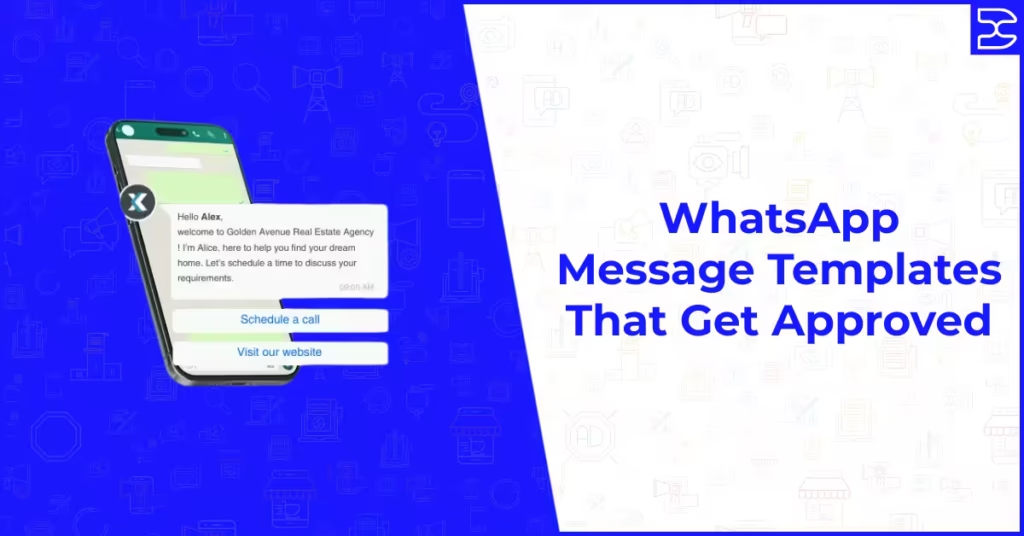
Table of Contents
ToggleWhatsApp Message Templates That Get Approved
Anyone who has tried to set up a WhatsApp Business API campaign knows that the template approval process can feel like a barrier rather than a formality. You write what seems like a perfectly reasonable message, submit it for review, and receive a rejection with a vague reason that leaves you guessing about what actually needs to change.
Template approval is not arbitrary. Meta has a specific and consistent set of rules that govern which message templates are accepted and which are rejected. Once you understand those rules clearly and see what approved templates actually look like in practice, writing messages that pass review on the first submission becomes considerably more straightforward.
This guide covers everything you need to know about WhatsApp message template approval in 2026: what templates are, why Meta reviews them, the rules that govern approval, the most common reasons templates are rejected, and examples of well-structured templates across the main use case categories that consistently pass review.
What Are WhatsApp Message Templates and Why Do They Need Approval
When a business uses the WhatsApp Business API to initiate a conversation with a customer, or to re-engage a customer after a 24-hour window has passed since the last interaction, it must use a pre-approved message template. Templates are structured messages that businesses submit to Meta for review before they can be sent.
The approval requirement exists because WhatsApp is a personal messaging platform. Meta introduced template review to protect users from spam, misleading content, and unsolicited promotional messages. Every template is evaluated against a set of content and formatting policies before it can be deployed in a live campaign or automated workflow.
Templates are not required for messages sent within an active 24-hour customer service window, where the customer has recently initiated contact. They are required for all proactive outbound messages and for any message sent after the 24-hour window closes. Understanding this distinction helps you plan which parts of your communication strategy require pre-approved templates and which can use free-form messaging.
Template-based messaging sits within the broader infrastructure of WhatsApp Business API tools. For a full overview of how the API works and which platforms give you access to it, our guide to the best WhatsApp marketing tools and platforms covers the options available to businesses at different scales.
How the Meta Template Review Process Works
When you submit a template, Meta reviews it typically within 24 hours, though in practice many templates are reviewed and approved or rejected within a few hours. The review is conducted by an automated system rather than a human reviewer in most cases, which means specific trigger words, formatting patterns, and policy violations are flagged consistently.
Templates are reviewed against Meta’s WhatsApp Business Messaging Policy, which covers content restrictions, formatting requirements, and the categories of messaging that are permitted on the platform. Understanding this policy is the foundation of writing templates that pass review.
Once approved, a template can be used in your campaigns and automated workflows. If a template is rejected, Meta provides a rejection reason, though these can sometimes be general rather than specific. You can edit and resubmit rejected templates, but repeated rejections of problematic templates can affect your account quality rating.
The Template Categories You Need to Know
Meta classifies message templates into categories, and choosing the correct category for your template is itself part of the approval process. Selecting a misleading category, such as submitting a promotional message as a transactional utility template, is a common cause of rejection.
Utility Templates
Utility templates are transactional messages directly related to a purchase, subscription, or service the customer has already engaged with. Order confirmations, shipping updates, appointment reminders, payment receipts, and account notifications all fall into this category. Utility templates have the highest approval rate because they provide clear value directly related to an existing customer interaction and contain no promotional content.
Authentication Templates
Authentication templates are used specifically for one-time passcodes and verification messages. They follow a tightly defined format and are generally straightforward to get approved as long as the content is limited to the authentication purpose and does not include any marketing language or additional calls to action beyond the verification process.
Marketing Templates
Marketing templates are used for promotional content, product announcements, offers, and any message designed to drive a commercial action from the recipient. Meta applies stricter scrutiny to marketing templates and has specific rules about language, offers, and opt-out mechanisms that must be followed. Marketing templates are perfectly permissible, but they require more careful writing to pass review.
The Rules That Govern Template Approval
No Threatening or Coercive Language
Templates that pressure recipients through threatening or manipulative language are consistently rejected. Phrases that imply negative consequences for inaction, or that create undue urgency through fear-based messaging, violate Meta’s content policy. This applies even when the urgency is genuine, such as a genuine limited-time offer. The tone must be informative and respectful rather than pressured.
No Vague or Misleading Content
Templates that are unclear about who is sending the message, what the message is about, or what action the recipient is being asked to take are rejected. Every template must make the sender identity clear, state the purpose of the message transparently, and include any call to action in explicit rather than implied terms. Misleading templates that suggest false scarcity, fabricated social proof, or inaccurate claims about a product or offer are rejected and can result in account restrictions.
Variables Must Be Used Appropriately
WhatsApp templates use variables, represented as double curly brackets around a number such as the customer name placeholder, to personalise messages. Variables must be used consistently and must not be used to insert entire sentences or paragraphs of variable content that could circumvent the review process. Meta rejects templates where the variable content could fundamentally change the nature of the message in ways that would not be approved if written explicitly.
No Sensitive Content Without Authorisation
Templates covering certain sensitive topic areas, including financial products, health claims, political content, and adult content, are subject to additional restrictions and may require business verification or category-specific authorisation before they can be used. Attempting to submit templates in restricted categories without the appropriate account-level permissions results in rejection.
Opt-Out Must Be Possible
Marketing templates in particular must allow recipients to opt out of future messages. Meta requires that marketing communications include a mechanism through which recipients can indicate they do not wish to receive further messages. This can be a reply keyword such as STOP, a button that triggers opt-out, or an explicit instruction to reply if the recipient wishes to be removed from the list. Templates that provide no opt-out pathway for marketing messages are rejected.
The opt-out requirement connects directly to the broader compliance obligations that govern WhatsApp marketing. For a full understanding of the legal and regulatory framework, our guide to WhatsApp marketing legality under GDPR covers what businesses operating in the UK and EU must have in place before sending any template-based campaigns.
The Most Common Reasons Templates Are Rejected
Overly Promotional Language in a Utility Category
Submitting a message that is primarily promotional under the utility category is one of the most common rejection triggers. If your message leads with a discount, an offer, or a call to buy, it belongs in the marketing category regardless of whether it is also related to a previous transaction. Be honest with yourself about the primary purpose of the message when selecting its category.
Unclear or Missing Business Identity
Templates that do not make clear who is sending the message or why the recipient is receiving it are rejected. Your business name should be identifiable within the template, either through an explicit mention or through the context of the message. Recipients should not have to guess who the sender is or why they are being contacted.
Excessive Use of Capital Letters or Special Characters
Templates that use excessive capitalisation, multiple exclamation marks, or special characters in a way that reads as spam-like are flagged by the automated review system. Write your template as you would write a professional direct communication, not as you would write an advertising banner.
Call to Action Without Clear Context
Templates that include a call to action without sufficient context for the recipient to understand why they are being asked to take that action are rejected. A link to a landing page, a button to book an appointment, or an instruction to reply with a keyword must be connected to a clear and logical reason that the recipient can understand without needing additional information outside the message.
Variable Content That Changes the Message Nature
Templates where variable content could be used to insert fundamentally different types of content on different sends, effectively creating multiple messages from a single approved template, are rejected. The core meaning and nature of the message must remain consistent regardless of how the variables are populated.
Approved Template Examples by Category
Utility Template: Order Confirmation
Hello [customer name], your order [order number] has been confirmed and is being prepared for dispatch. You will receive a shipping update with tracking details once your order is on its way. Thank you for shopping with [business name]. Reply HELP if you need assistance.
Utility Template: Appointment Reminder
Hi [customer name], this is a reminder that your appointment with [business name] is scheduled for [date] at [time]. Please arrive five minutes early. To reschedule or cancel, reply to this message or call us at [phone number].
Utility Template: Payment Confirmation
Hello [customer name], we have received your payment of [amount] for [service or product name]. Your receipt reference is [reference number]. Thank you for your payment. Contact us at [contact detail] if you have any questions.
Marketing Template: Promotional Offer
Hi [customer name], we have an exclusive offer for you. Get [discount percentage] off your next [product or service] when you book before [date]. Use code [code] at checkout. Visit [link] to claim your offer. Reply STOP to opt out of future messages.
Marketing Template: New Product or Service Announcement
Hello [customer name], we are excited to let you know that [product or service name] is now available. [One-sentence description of what it offers]. Find out more and book your [appointment or purchase] at [link]. Reply STOP to unsubscribe.
Marketing Template: Re-engagement
Hi [customer name], we have not heard from you in a while and wanted to reach out. We have some updates at [business name] that we think you will find useful, including [brief relevant update or offer]. Visit [link] to learn more. Reply STOP if you prefer not to receive messages from us.
Getting your templates approved is the first step. How you structure your broadcast campaigns and manage your contact lists once those templates are live is covered in our guide to WhatsApp broadcast lists and how to use them effectively, which explains the practical mechanics of running compliant campaigns at scale.
Tips for Writing Templates That Pass First Time
Read the Template From the Recipient’s Perspective
Before submitting, read your template as if you have just received it as a WhatsApp message from a business you have interacted with before. Ask whether the message is clear, whether the reason for receiving it is obvious, and whether the call to action is logical. If anything feels confusing, vague, or pushy from the recipient’s perspective, the automated review system is likely to flag the same issues.
Keep the Language Professional and Conversational
WhatsApp is a personal messaging channel. Templates that read like formal letters or aggressive advertising copy feel out of place in the platform context and often trigger rejection. Aim for language that is direct, respectful, and appropriately warm without crossing into informal slang or overly salesy territory.
Be Specific About Variable Usage
Where you use variables, make sure the surrounding context in the template makes clear what type of content the variable will contain. A variable appearing in a location where multiple fundamentally different types of content could logically be inserted raises review flags. The non-variable content of your template should establish clear context for every variable it contains.
Test With a Smaller Variation First
If you are unsure whether a particular approach to template writing will pass review, submit a conservative version first to establish an approved baseline. Once you have an approved template, you can submit variations that test slightly different approaches. This builds your understanding of what the review system accepts without risking your account quality rating through repeated rejections of experimental templates.
Building a compliant, well-structured WhatsApp marketing setup involves more than approved templates. It requires the right tools, proper consent management, and a clear understanding of how the channel fits into your broader marketing approach. Our overview of WhatsApp marketing statistics and what they mean for your business gives you the data context to make well-informed decisions about how to invest in the channel.
Final Thoughts
Writing WhatsApp message templates that pass Meta review is a skill that becomes straightforward once you understand the underlying logic of the approval system. Templates are reviewed against consistent, principled rules designed to protect users from spam and misleading content. When your templates are genuinely useful, transparently written, correctly categorised, and respectful of the recipient’s experience, approval becomes the norm rather than the exception.
The effort invested in writing good templates pays dividends beyond the approval process itself. Templates that are clear, relevant, and well-structured generate better engagement and lower opt-out rates than those that push against the boundaries of what is permitted. The discipline that approval requires is also the discipline that makes WhatsApp an effective and trusted communication channel for the businesses that use it well.
If you want to build a WhatsApp marketing programme from the ground up, with the right tools, compliant templates, and a strategy that integrates with your broader digital marketing approach, explore how our digital marketing strategy and campaign services support businesses in using WhatsApp as a genuine revenue-driving channel.
Frequently Asked Questions (FAQs)
WhatsApp message templates require Meta approval because the platform is a personal messaging environment where users expect to receive messages from people and businesses they have chosen to engage with. The approval process protects users from spam, misleading content, and unsolicited promotional messages. Every template is reviewed against Meta's WhatsApp Business Messaging Policy before it can be used in proactive or automated outbound messaging.
Most WhatsApp message templates are reviewed within 24 hours of submission, and many are approved or rejected within a few hours. The review is conducted primarily by an automated system, which means approval speed is generally consistent. Templates that trigger manual review due to sensitive content categories or policy edge cases may take longer. Submitting templates well in advance of your campaign go-live date is advisable to allow for resubmission if a rejection occurs.
The most common rejection reasons are submitting a promotional message in the utility category, using vague or misleading language, including pressure-based or coercive calls to action, using excessive capitalisation or spam-like formatting, failing to include an opt-out mechanism in marketing templates, and using variables in ways that could fundamentally alter the message content in ways that would not be independently approved.
Yes. A rejected template can be edited to address the issues flagged in the rejection reason and resubmitted for review. Meta provides a rejection reason with each declined template, which should guide your revisions. It is important to make meaningful changes that actually address the policy concern rather than resubmitting without changes, which will result in the same rejection and may negatively affect your account quality rating.
Yes. Meta requires that marketing templates include a mechanism through which recipients can opt out of future messages. This can take the form of a reply keyword such as STOP, a button that triggers removal from the send list, or an explicit instruction within the message body explaining how to unsubscribe. Utility templates do not have the same mandatory opt-out requirement, though providing a contact or help option is considered best practice.
The number of message templates a WhatsApp Business account can have depends on the account tier and the quality rating of the account. Standard accounts typically start with a limit of around 250 templates, which increases as the account builds a track record of high-quality messaging with low opt-out and complaint rates. Accounts with a high quality rating can qualify for significantly higher template limits. Maintaining a strong account quality rating through consent-based messaging and low complaint rates is the most reliable way to increase template capacity over time.
Our Related Posts