Common SEO Mistakes: The 2026 Guide for Businesses
Introduction: Why Good Businesses Still Get SEO Wrong
Here is a situation we encounter weekly. A business owner spends three months publishing content, paying for tools, and following SEO advice they found online. Then they check their Google Search Console and find that organic traffic has barely moved. In some cases it has dropped. The pain is real and the frustration is justified. SEO takes time and investment. When it does not deliver, it feels like the channel simply does not work. But in the vast majority of cases we audit, the channel is fine. The execution has specific, fixable problems that nobody has identified yet. The deeper issue is that SEO advice online has a long shelf life even when it has expired. Tactics that worked in 2019 still circulate as current best practice in 2026. Businesses following outdated guidance optimize for signals Google deprioritised years ago while missing the factors that actually determine rankings today. This guide covers the most damaging SEO mistakes we see in real business websites in 2026. For each one, you will understand exactly why it suppresses rankings, what it looks like in practice, and the specific steps to fix it. By the end, you will have a clear framework for auditing your own site and identifying which mistakes are currently costing you organic visibility. This guide focuses on the mistakes themselves. For a structured framework to audit every SEO area systematically, our complete on-page SEO checklist and technical SEO checklist give you the specific checks to run after identifying your problem areas.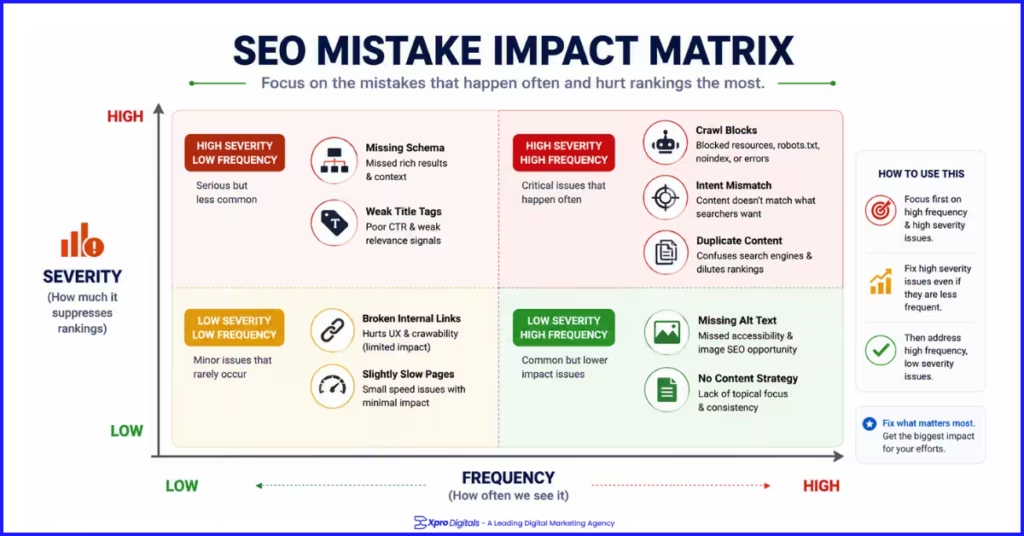
Mistake 1: Ignoring Technical SEO Foundations
The most expensive SEO mistake a business can make is investing in content while the technical foundation is broken. Content cannot rank if Google cannot access, render, and index the pages it lives on. Technical problems create invisible ceilings that no amount of content investment can break through. We audited a health and wellness ecommerce store that had published over 200 blog posts and rewritten all their product descriptions over 18 months. Organic traffic had not moved. A technical audit revealed that their entire blog directory was blocked by robots.txt. Not one of those 200 posts had ever been indexed. The content investment was real. The technical error made it invisible. After removing the robots.txt block and submitting an updated sitemap, 140 of those posts were indexed within four weeks. Organic traffic to the blog section grew from zero to 3,400 monthly sessions in the following six weeks. No new content was published during that period.Common Technical SEO Mistakes
| Technical Mistake | What It Causes | How to Find It | Fix |
| Robots.txt blocking key pages | Pages never crawled or indexed | GSC robots.txt tester | Remove Disallow rules on indexable directories |
| no-index on published pages | Pages excluded from Google’s index | Screaming Frog, GSC Coverage | Remove no-index from meta robots tag |
| Missing or wrong canonical tags | Duplicate content splits ranking signals | Screaming Frog canonical audit | Add self-referencing or preferred URL canonical |
| Broken XML sitemap | Google misses important pages | GSC Sitemaps report | Fix errors, resubmit clean sitemap |
| Redirect chains | Authority diluted across multiple hops | Screaming Frog redirect audit | Update all links to point to final destination |
| Core Web Vitals failures | Page experience ranking penalty | PageSpeed Insights (mobile) | optimize images, defer scripts, add img dimensions |
Mistake 2: Targeting Keywords Without Understanding Search Intent
The second most damaging mistake is targeting keywords based on search volume alone without understanding the intent behind them. Google’s core ranking criteria in 2026 heavily weights intent alignment. A page that targets a keyword but does not serve the actual goal behind that search will consistently underrank, regardless of how well its other elements are optimized. We worked with a B2B software company that had created a detailed long-form guide targeting the keyword ‘CRM software’. They expected the guide to rank for this high-volume commercial term. After three months the page ranked position 34. The problem was intent: every top-ranking result for ‘CRM software’ was a product comparison page or a category listing. Their informational guide format mismatched what Google had determined searchers at that stage actually wanted. We restructured the page into a comparison format covering the top five CRM tools with clear criteria tables and a recommendation section. Within eight weeks the page moved to position 7 with no change to keyword targeting, domain authority, or link building.The Four Search Intent Types
| Intent Type | Searcher Goal | Right Format | Wrong Format |
| Informational | Learn or understand something | Guide, explainer, tutorial | Product page or landing page |
| Commercial | Research before buying | Comparison, review, best-of list | Blog post or informational guide |
| Transactional | Buy or take action now | Product page, landing page | Comparison article or how-to guide |
| Navigational | Find a specific brand or site | Homepage, brand page | Generic category or blog content |
Mistake 3: Publishing Thin or Duplicate Content
Thin content, pages with very little original useful information, and duplicate content, pages that repeat content from elsewhere on your site or from external sources, are two of the most persistent quality problems Google identifies and acts on. Both suppress rankings. Both are extremely common. Thin content is not just short pages. A 1,500-word post that circles the same three points without adding depth or original value is thin content. Google’s helpful content system, rolled out as part of ongoing core updates, specifically targets content written to rank rather than content written to serve the reader. Duplicate content in ecommerce is frequently unintentional. Product variant URLs generating near-identical pages, manufacturer descriptions used verbatim across hundreds of stores, and paginated category pages that replicate the top of the category content are all common sources. Each dilutes your ranking signals without you realising it.Duplicate Content Sources in Ecommerce
| Source | Example | Fix |
| Product variant URLs | /product?colour=red and /product?colour=blue | Canonical all variants to main product URL |
| Manufacturer descriptions | Same paragraph on 400 store websites | Write original descriptions for every product |
| Category pagination | /category/page/2 duplicating /category intro | Canonical paginated pages to page one |
| HTTP vs HTTPS | Both versions accessible without redirect | 301 redirect HTTP to HTTPS sitewide |
| www vs non-www | Both versions accessible without redirect | 301 redirect one version to the preferred |
| Filter URL combinations | /shoes?size=10&colour=red generating unique URLs | no-index or canonical filter combinations |
Mistake 4: Neglecting On-Page SEO Basics
Surprisingly common in 2026: businesses with reasonable domain authority and decent content that still have generic title tags, missing H1 tags, and no keyword strategy at the page level. These are the most basic on-page signals Google reads. Ignoring them is like painting a shop front but removing the sign above the door. A solicitors firm we audited had a well-structured website with strong backlinks from legal directories. Their primary service page for ‘family law solicitors London’ ranked position 23. The title tag was ‘Family Law | Our Firm Name’. The H1 was ‘Our Family Law Services’. The page had 180 words of generic copy. No schema markup, no internal links to or from the page. We rewrote the title tag to ‘Family Law Solicitors London: Free Initial Consultation | Firm Name’, updated the H1, expanded the content to 650 words covering specific practice areas, added LocalBusiness schema, and linked the page from three blog posts. It moved to position 4 in seven weeks.On-Page SEO Mistakes and Their Fixes
| On-Page Mistake | Why It Hurts | Quick Fix |
| Generic or missing title tag | No primary keyword signal for Google | Lead with keyword, under 60 chars, unique |
| Multiple H1 tags on one page | Dilutes the primary topic signal | Keep exactly one H1 per page |
| H1 does not match page topic | Disconnect between heading and content | H1 should state what the page is clearly about |
| No keyword in first 100 words | Delayed relevance signal | Include primary keyword naturally in opening paragraph |
| Content mismatches search intent | Page ranks far below potential | Match format to what top results use |
| No schema markup | Missing rich result eligibility | Add correct schema type, validate in Rich Results Test |
| No internal links to or from page | Orphaned page with no authority flow | Link from 2-3 related pages, link out to 2-3 related pages |
| Missing image alt text | Lost keyword relevance and image traffic | Add descriptive alt text to every image |
Mistake 5: Ignoring Page Speed and Core Web Vitals
Page speed became a Google ranking factor in 2018. Core Web Vitals were confirmed as ranking signals in 2021. Yet in 2026, a significant proportion of business websites still fail Core Web Vitals assessments, particularly on mobile. Every page that fails LCP, INP, or CLS benchmarks receives a page experience penalty that suppresses rankings relative to equally relevant pages that pass. Beyond rankings, slow pages directly destroy conversion rates. An ecommerce client we audited had a product page LCP of 9.2 seconds on mobile. Their conversion rate on mobile was 0.4% versus 2.8% on desktop. After optimising product images to WebP format, deferring three non-critical third-party scripts, and adding explicit image dimensions to fix CLS, mobile LCP dropped to 1.8 seconds. Mobile conversion rate improved to 1.9% over the following six weeks. Organic rankings for the page improved by five positions.Core Web Vitals: Good vs Failing Thresholds
| Metric | What It Measures | Good | Needs Improvement | Poor | Most Common Cause |
| LCP | Largest content load time | Under 2.5s | 2.5s to 4s | Over 4s | Unoptimized hero image |
| INP | Page responsiveness | Under 200ms | 200ms to 500ms | Over 500ms | Excessive JavaScript |
| CLS | Visual layout stability | Under 0.1 | 0.1 to 0.25 | Over 0.25 | Images without dimensions |
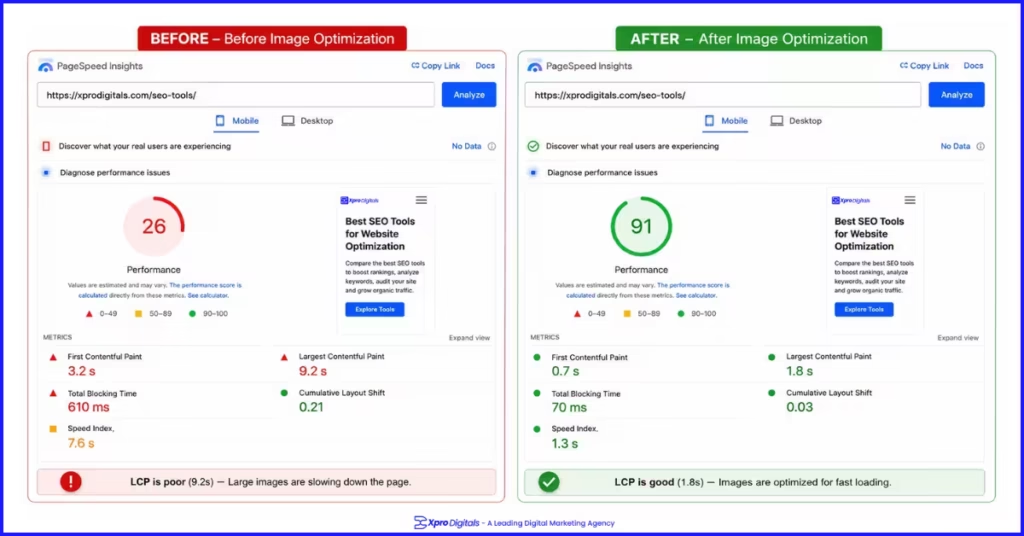 For ecommerce stores where product image quality is central to conversion, balancing image optimization for speed and quality requires specific techniques. Our ecommerce Core Web Vitals optimization guide covers LCP, INP, and CLS fixes specifically for product and category pages.
Mistake 6: Ignoring Mobile SEO
Google uses mobile-first indexing for every website. This means the mobile version of your site is what Google primarily evaluates for ranking purposes. Businesses that have invested SEO effort in their desktop experience while treating mobile as secondary are being judged on their weakest version. The specific mobile mistakes we see most often: text that requires pinching and zooming to read, tap targets that are too small or too close together, content that is present on desktop but hidden or collapsed on mobile by default, and intrusive interstitials that cover the main page content on mobile load. Each of these triggers negative mobile usability signals in Google’s page experience evaluation. Test your key pages manually on a real mobile device, not just in a browser emulator. Browser emulation does not replicate real mobile performance accurately. Pay specific attention to your product pages, category pages, and service landing pages, which carry the highest commercial value and are the most critical to optimize for mobile experience.Mistake 7: Building No Links or the Wrong Links
Off-page SEO through backlink building remains one of Google’s strongest ranking signals. Two opposing mistakes appear consistently: businesses that ignore link building entirely and wonder why they cannot outrank competitors with stronger domain authority, and businesses that pursue low-quality links through paid schemes, link farms, or irrelevant directories that risk triggering a manual penalty. The correct approach is earning links from topically relevant, credible sources through content that genuinely deserves citation. Original research, comprehensive guides, useful tools, and digital PR campaigns are the formats that earn high-quality backlinks naturally. A single link from a credible industry publication is worth more for rankings than fifty links from irrelevant generic directories.Link Building: Effective vs Harmful Approaches
| Approach | Effect on Rankings | Risk Level | Recommended? |
| Original research that earns citations | Strong authority signal from relevant sources | None | Yes |
| Digital PR and media outreach | High-authority links from publications | None | Yes |
| Supplier and partner links | Relevant links from business relationships | Low | Yes |
| Guest posting on relevant sites | Topical authority links | Low | Yes (selectively) |
| Buying links from link networks | Short-term boost, manual penalty risk | Very High | Never |
| Generic directory submissions | Minimal positive effect | Low to Medium | Rarely |
| Footer or widget links at scale | Unnatural pattern, scrutinised by Google | Medium | No |
| Reciprocal link exchanges | Natural in small volume, risky at scale | Medium | Limited |
Mistake 8: Neglecting Local SEO
For any business that serves a geographic area, local SEO is one of the highest-return channels available. Yet the majority of local businesses we audit have either an incomplete Google Business Profile, inconsistent NAP (Name, Address, Phone number) information across directories, or no strategy for generating genuine customer reviews. A plumbing business we worked with was ranking position 18 in local organic results for ’emergency plumber London’ and not appearing in the Map Pack at all. Their Google Business Profile had been claimed but had no photos, no business description, no service list, and four months without a single post. They had 3 reviews averaging 4.3 stars. Competitors in the Map Pack had between 47 and 180 reviews. After fully optimising the GBP, requesting reviews from recent customers (ethically, through follow-up messages), and fixing NAP inconsistencies across 14 directories, the business entered the Map Pack within six weeks and moved to position 5 in local organic results within ten weeks. Our guide on Google Business Profile optimization covers every element of setting up and maintaining a profile that earns consistent Map Pack and local organic visibility.Mistake 9: Publishing Content Without a Strategy
Publishing blog content regularly is not a content strategy. A content strategy means every piece you publish targets a researched keyword, matches the search intent behind that keyword, links to relevant product or service pages, and sits within a topical cluster that builds authority across a subject area. We audited a marketing agency that had published 94 blog posts over two years. Only 11 had a clearly identifiable target keyword. Of those 11, four were targeting keywords their service pages were already targeting, creating keyword cannibalism. The remaining 83 posts had no keyword strategy, no internal links to service pages, and no topical relationship to each other. Combined, they generated 340 monthly organic sessions. Rebuilding the content strategy around their core service topics and retrofitting keyword targets to existing posts generated 2,800 monthly sessions within five months.Content Strategy Checklist
| Content Strategy Element | Common Mistake | What Good Looks Like |
| Keyword research | Publishing without a target keyword | Every piece targets a researched query with clear intent |
| Intent alignment | Writing guides for transactional keywords | Format matches what top results use for each query |
| Topical clustering | Random topics with no theme | Content grouped around core topics and linked together |
| Internal linking | Blog posts link nowhere useful | Every post links to relevant service or product pages |
| Keyword cannibalism | Two pages targeting the same keyword | One page per keyword, stronger page consolidates weaker |
| Content freshness | Posts never updated after publishing | Top pages reviewed and refreshed quarterly |
| E-E-A-T signals | No author, no data, no original perspective | Author bio, original data, cited sources, real examples |
Mistake 10: Missing or Broken Schema Markup
Schema markup gives Google machine-readable context about your page content. It enables rich results in search, including star ratings, FAQ expansions, product pricing displays, and breadcrumb trails. These rich results increase your listing’s visual size in search results and consistently deliver higher click-through rates than standard blue link listings. The most common schema mistakes we find are: no schema implemented at all, schema that has validation errors in Google’s Rich Results Test, schema that includes properties not matched by visible page content (which triggers a rich result penalty), and schema applied at the wrong page type such as Product schema on a category listing page. Our ecommerce schema markup implementation guide covers Product, Offer, AggregateRating, FAQPage, and BreadcrumbList schema implementation with working code examples and validation steps for each type.Mistake 11: Tracking the Wrong Metrics
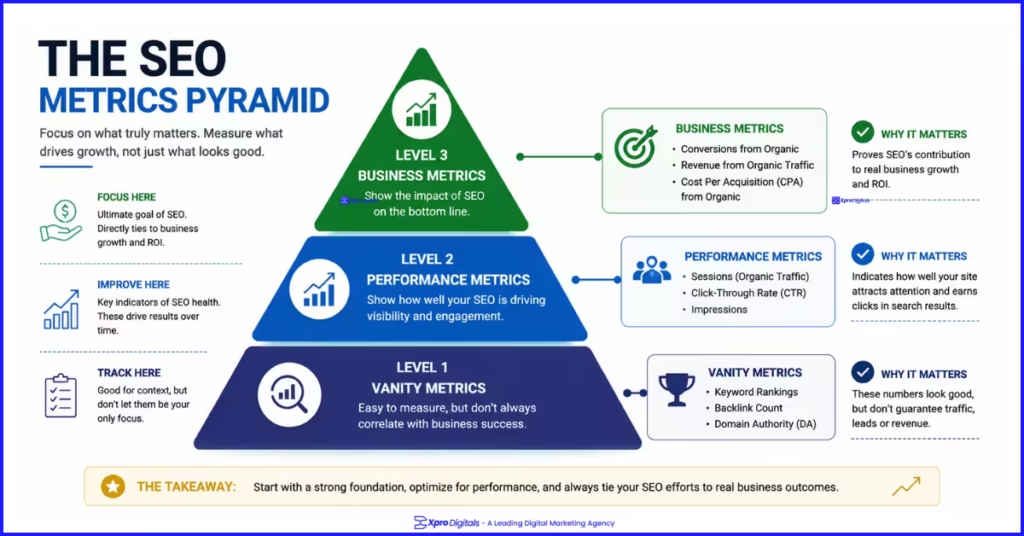
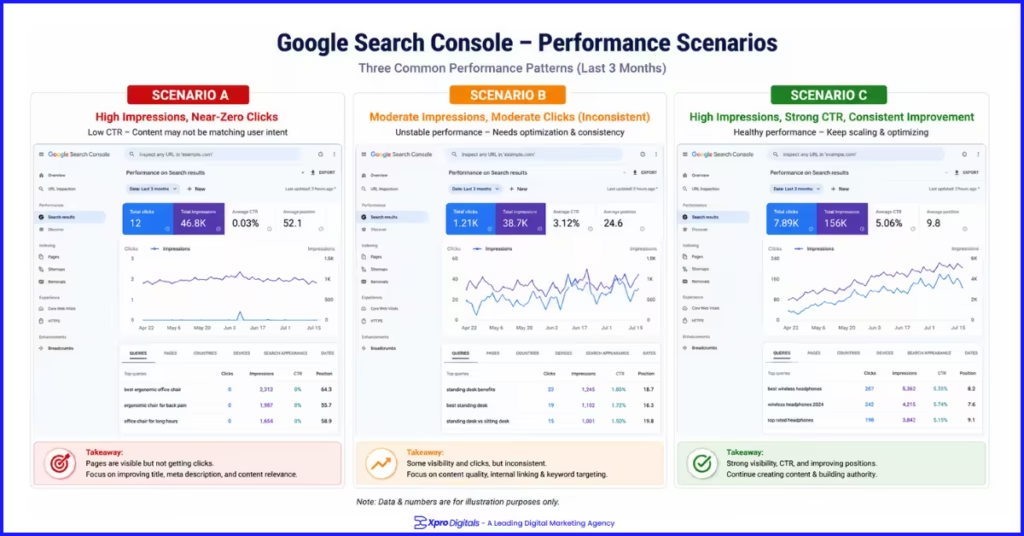
Businesses that track keyword rankings as their primary SEO success metric are optimising in the wrong direction. A page can rank position one for a keyword that drives zero business outcome. A page generating significant revenue from organic traffic can drop without triggering any dashboard alert if rankings are the only metric being watched. The metrics that actually connect SEO to business performance are organic sessions by landing page, organic conversions and revenue by landing page, click-through rate by page from Search Console, and keyword position only when cross-referenced against click volume and conversion data. Rankings without context are vanity metrics.Metrics That Matter vs Metrics That Mislead
| Metric | What It Actually Tells You | Useful? |
| Keyword ranking position | Your position for one query | Only if correlated with CTR and traffic |
| Organic sessions by landing page | Which pages drive real traffic | Yes, high value |
| Organic conversions and revenue | SEO’s actual business impact | Yes, essential |
| Click-through rate by query | Title tag and meta description performance | Yes, actionable |
| Impressions without clicks | Queries you appear for but do not win | Yes, identifies optimization opportunities |
| Domain authority score | Estimated site authority from third-party tools | As comparative benchmark only |
| Number of backlinks | Total link count | Only if filtered for quality and relevance |
| Core Web Vitals by page type | Page experience affecting rankings | Yes, technical health signal |