SEO Audit Checklist: The Complete Step-by-Step Guide for 2026
Introduction: Why Most SEO Audits Find the Wrong Things
Here is a pattern that repeats constantly. A business runs an SEO audit using an automated tool. The tool produces a report with hundreds of flagged items. The team spends weeks fixing minor issues like missing image alt text on low-traffic pages while the actual performance blocker, a robots.txt rule quietly blocking 40% of the site from Googlebot, goes unnoticed because it did not appear in the automated summary.
The pain is real. SEO audits take time and internal resources to run. When they identify the wrong priorities, that time is wasted. Businesses fix cosmetic issues while structural problems continue suppressing organic performance month after month.
The problem is not the concept of an SEO audit. It is the lack of a structured approach that separates critical issues from minor ones, sequences checks in the right order, and connects findings to actual business impact. A good SEO audit is not about finding the most items on a list. It is about finding the right items and fixing them in the order that produces the fastest improvement in organic visibility.
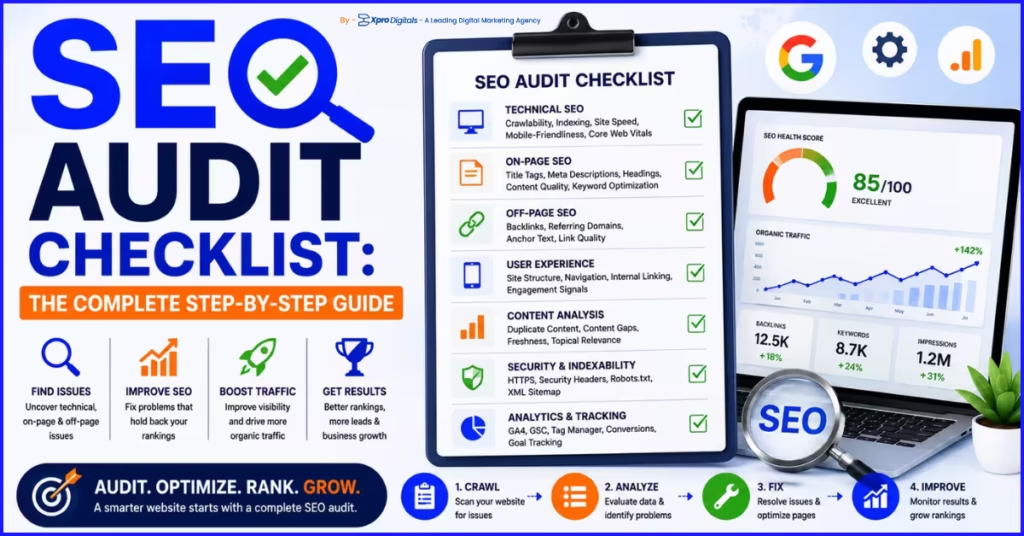
This guide gives you that structure. A complete SEO audit checklist covering every significant area of search optimization, sequenced by priority, with specific tools for each check, pass and fail criteria, and the business impact of each finding. By the end you will have a repeatable framework for auditing any website and a clear understanding of what to fix first.
This audit checklist is the diagnostic tool. For the strategic context that determines what a passing audit should look like, our guide on what SEO is and how it works covers the foundational principles that make every audit check meaningful.
How to Use This SEO Audit Checklist
Work through each section in order. The sections are sequenced by priority: technical crawlability issues come first because they affect everything else. A schema implementation error does not matter if the page is not indexed. Fix structural blockers before cosmetic improvements.
For each check: mark the status as Pass, Fail, or N/A for your site. Document every failing item with the specific URLs or pages affected. After completing the full audit, create a prioritised fix list ordered by business impact. Assign each fix to the person or team responsible and set a realistic completion date.
Run this audit using the tools listed in each section. Automated tools find many issues but miss the context that makes some issues critical and others irrelevant. Combine automated crawl data with manual spot checks on your most important pages. The combination is more reliable than either approach alone.
Schedule this audit quarterly for actively managed sites, and immediately after any significant site change including platform migrations, theme updates, CMS changes, or major content restructures.
Audit Section 1: Crawlability and Indexation
This is the most critical section. Every other audit area is irrelevant if Googlebot cannot access and index your pages. Run this section first. If you find critical blockers here, stop and fix them before continuing.
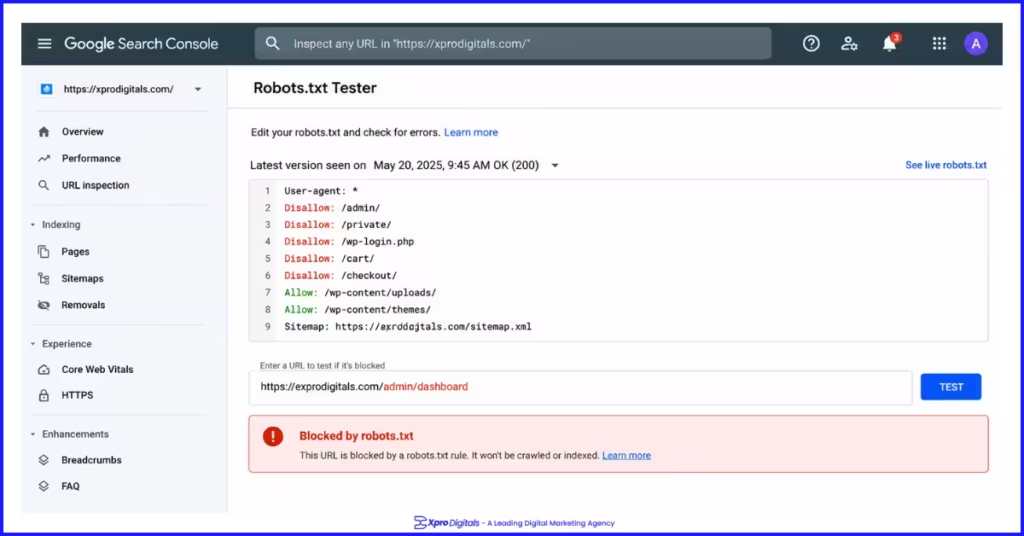
We ran an audit for a professional services firm whose organic traffic had been flat for nine months despite regular content publication. The first crawlability check revealed their robots.txt file was blocking the Disallow: /blog/ directory. Every post published over nine months had been invisible to Google. Removing that single rule and resubmitting the sitemap produced measurable ranking improvements within five weeks. No other changes were needed to unlock that growth.
Crawlability Checks
| Check | Tool | Pass Criteria | Fail Signal | Done? |
| Robots.txt accessible and correct | GSC Robots.txt Tester | Returns 200, no key directories blocked | Blocks /blog/, /products/, or other key paths | |
| XML sitemap submitted and error-free | GSC Sitemaps Report | Submitted, zero errors, all URLs return 200 | Errors shown, 404s or redirected URLs included | |
| Sitemap contains only canonical indexable URLs | Screaming Frog Sitemap Audit | All sitemap URLs are self-canonical and indexed | no-index or redirected pages in sitemap | |
| No crawl errors on key pages | GSC Coverage Report | Zero 4xx or 5xx on priority pages | 404 or 500 errors on linked pages | |
| No redirect chains over one hop | Screaming Frog Redirect Audit | All redirects go directly to final destination | Chains of 3+ hops from old to final URL | |
| No broken internal links | Screaming Frog, Ahrefs | All internal links return 200 status | Internal links returning 404 | |
| JavaScript not blocking key content | GSC URL Inspection Rendered Page | Rendered HTML matches visible browser content | Key content absent in rendered HTML | |
| All important pages have inbound internal links | Screaming Frog Crawl | Every key page has at least one internal link | Orphaned pages with zero inbound links |
Indexation Checks
| Check | Tool | Pass Criteria | Fail Signal | Done? |
| Key pages indexed in Google | GSC URL Inspection | ‘URL is on Google’ confirmed | Excluded, no-index, or crawl anomaly shown | |
| No accidental no-index on published pages | Screaming Frog, View Source | No no-index in meta robots on key pages | no-index present in head section on ranking pages | |
| No x-robots-tag no-index in server headers | Screaming Frog Response Headers | No no-index in HTTP response header | Server-level no-index blocking directories | |
| GSC Coverage exclusions investigated | GSC Coverage Report | All exclusions are intentional | Large volume of unexpected ‘Excluded by no-index’ | |
| Crawled but not indexed pages addressed | GSC Coverage Report | Minimal ‘Crawled, not currently indexed’ pages | High volume of crawled but unindexed pages | |
| Duplicate content resolved | Siteliner, Screaming Frog | Single canonical version of each page indexed | Near-identical pages competing in index |
Audit Section 2: On-Page SEO
On-page SEO determines what queries each page ranks for and how prominently. Technical access is the prerequisite. On-page signals are what determines which position your accessible pages earn.
Title Tag Audit
| Check | Tool | Pass Criteria | Fail Signal | Done? |
| Every page has a unique title tag | Screaming Frog Title Report | Zero duplicate title tags across the site | Multiple pages with identical titles | |
| Title tags include primary keyword | Screaming Frog, Manual Review | Primary keyword in first half of title | Keyword absent or buried at end of title | |
| Title tags under 60 characters | Screaming Frog Title Length | All titles display fully in SERPs | Titles truncated in search results | |
| No missing title tags | Screaming Frog | Every indexed page has a title tag | Pages returning blank title tag |
Meta Description Audit
| Check | Tool | Pass Criteria | Fail Signal | Done? |
| Every page has a unique meta description | Screaming Frog Meta Report | Zero duplicate meta descriptions | Same description across multiple pages | |
| Meta descriptions under 155 characters | Screaming Frog | All descriptions visible without truncation | Descriptions cut off in search results | |
| No missing meta descriptions | Screaming Frog | Every indexed page has a written description | Pages with auto-generated or empty descriptions |
Heading Structure Audit
| Check | Tool | Pass Criteria | Fail Signal | Done? |
| Single H1 on every page | Screaming Frog, HeadingsMap Extension | Exactly one H1 per page across the site | Multiple H1s or missing H1 on key pages | |
| H1 includes primary keyword | Manual Review of Key Pages | Primary keyword present in H1 naturally | H1 is generic or keyword absent | |
| Logical H2 and H3 hierarchy | HeadingsMap Browser Extension | H1 > H2 > H3 structure with no skipped levels | Jumping from H1 to H4, or no H2s present |
Content Quality Audit
| Check | Tool | Pass Criteria | Fail Signal | Done? |
| Content matches search intent | Manual SERP review for each keyword | Page format matches top-ranking result format | Informational content targeting transactional keyword | |
| No thin content on indexed pages | Screaming Frog Word Count Filter | All indexed pages have substantive original content | Pages under 200 words indexed with no media | |
| No duplicate or copied content | Copyscape, Siteliner | All content is original to the site | Manufacturer copy or syndicated content | |
| Primary keyword in first 100 words | Manual Review | Keyword appears naturally in opening paragraph | No keyword mention until halfway through content |
For a detailed breakdown of every on-page element to audit, our complete on-page SEO checklist covers title tags, headings, content depth, schema, images, and internal links in full with specific pass and fail criteria for each.
Audit Section 3: Technical Performance
Technical performance directly affects ranking position through Core Web Vitals as a confirmed ranking factor, and indirectly through bounce rate and engagement signals generated by page speed. A site with excellent content and poor performance will lose ranking ground to a technically superior competitor in the same topic space.
An ecommerce client had strong content and product pages but mobile LCP of 8.1 seconds on key category pages. Competitor category pages loaded in 1.8 seconds. After image compression and third-party script deferral, LCP improved to 1.9 seconds. Category page rankings improved by an average of 3.2 positions on mobile within eight weeks. No content changes were made.
Core Web Vitals Audit
| Metric | Good Threshold | Tool | Most Common Cause of Failure | Done? |
| LCP (Largest Contentful Paint) | Under 2.5 seconds on mobile | PageSpeed Insights (Mobile Tab) | Unoptimized hero image without fetchpriority | |
| INP (Interaction to Next Paint) | Under 200ms on mobile | PageSpeed Insights (Mobile Tab) | Heavy third-party JavaScript execution | |
| CLS (Cumulative Layout Shift) | Under 0.1 on mobile | PageSpeed Insights (Mobile Tab) | Images without explicit width and height dimensions |
Page Speed and Technical Performance Checks
| Check | Tool | Pass Criteria | Fail Signal | Done? |
| Images in WebP format | Screaming Frog Image Audit | All photography served as WebP | JPEG or PNG used for large images | |
| Images compressed under 150KB average | PageSpeed Insights Opportunities | Key page images under 150KB | Images over 500KB on any priority page | |
| Explicit dimensions on all images | PageSpeed Insights Diagnostics | All img tags have width and height set | Missing dimensions causing layout shift | |
| Hero image not lazy loaded | View Page Source | No loading=’lazy’ on above-fold hero image | Hero/LCP image has lazy loading applied | |
| Non-critical scripts deferred | PageSpeed Insights Opportunities | Third-party scripts deferred or async | Render-blocking JavaScript in head section | |
| Server response time under 600ms | PageSpeed Insights, GTmetrix | TTFB under 600ms consistently | TTFB over 1.5 seconds on hosting plan | |
| Caching configured | Screaming Frog Response Headers | Cache-Control headers on static assets | No caching, assets redownloaded every visit |
For the full technical performance audit framework covering crawl budget, architecture, redirects, and structured data alongside speed, our technical SEO checklist provides the complete reference with over 60 specific checks.
Audit Section 4: Mobile SEO
Google indexes the mobile version of your site first. Rankings are determined by how Google evaluates your mobile pages, not your desktop pages. A mobile audit is therefore not optional. It is the primary version of your site audit.
Mobile SEO Checks
| Check | Tool | Pass Criteria | Fail Signal | Done? |
| Site passes mobile-friendly test | Google Mobile-Friendly Test | Page is mobile-friendly confirmed | Mobile usability errors reported | |
| No mobile usability errors in GSC | GSC Mobile Usability Report | Zero issues listed | Text too small, tap targets too close, viewport issues | |
| Viewport meta tag present | View Page Source | meta name=’viewport’ in head section | Missing viewport, desktop rendering on mobile | |
| Text readable without zooming | Manual Mobile Device Test | Base font 16px or larger | Text under 12px requiring pinch zoom | |
| Tap targets 48x48px minimum | Google Mobile-Friendly Test | All interactive elements adequately sized | Buttons or links too small or overlapping | |
| No intrusive interstitials on mobile load | Manual Mobile Device Test | No full-screen pop-up on page load | Interstitial blocking main content on mobile | |
| Core Web Vitals pass on mobile specifically | PageSpeed Insights Mobile Tab | LCP, INP, CLS all passing on mobile | Desktop passes but mobile fails metrics |
Audit Section 5: Site Architecture and URL Structure
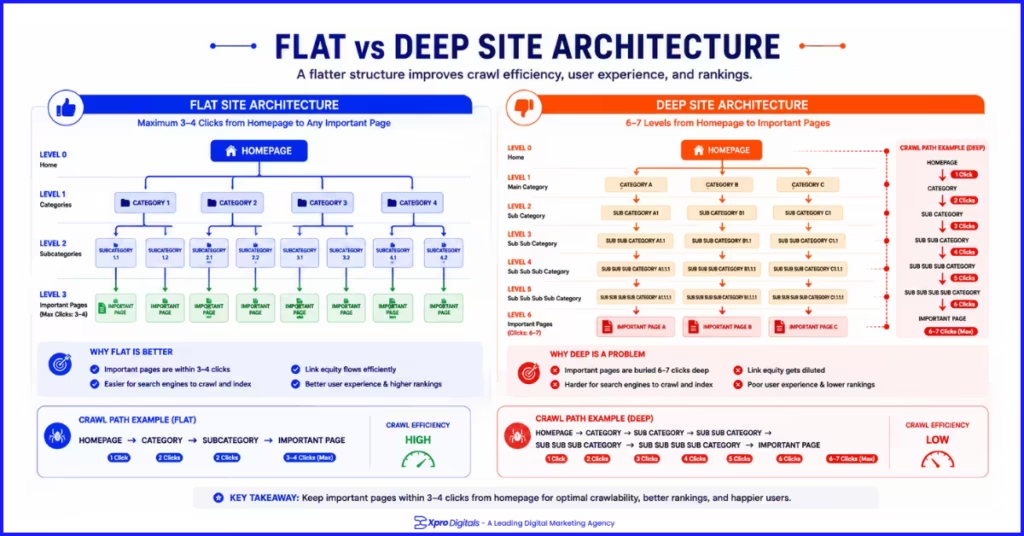
Site architecture determines crawl efficiency and authority flow. Poor architecture means Google wastes crawl budget on low-value pages while your most important pages get crawled infrequently. It also means authority earned by popular pages does not distribute effectively to pages that need it.
Architecture and URL Checks
| Check | Tool | Pass Criteria | Fail Signal | Done? |
| Key pages within 4 clicks of homepage | Screaming Frog Crawl Depth Report | Priority pages at depth 4 or less | Product or service pages at depth 7 or deeper | |
| No orphaned pages | Screaming Frog Crawl vs Sitemap | Every indexed page has at least one internal link | Sitemap pages with zero inbound internal links | |
| Breadcrumbs implemented | Manual Check on Key Pages | Breadcrumb trail visible on category and product pages | No breadcrumbs, navigation only from homepage | |
| Faceted navigation controlled | GSC Coverage, Screaming Frog | Filter URLs no-indexed or canonicalised to base category | Thousands of filter URL combinations in index | |
| URLs are lowercase with hyphens | Screaming Frog URL Report | All lowercase, hyphens between words, no underscores | Mixed case or underscores in URL paths | |
| No parameters in canonical URLs | Screaming Frog | Clean URLs without session or tracking parameters | Parameter URLs indexed as separate pages | |
| Internal links use descriptive anchor text | Screaming Frog Anchor Text Report | Descriptive text reflecting destination page topic | Generic ‘click here’ or ‘read more’ anchor text |
Audit Section 6: Canonical Tags and Duplicate Content
Canonical issues are among the most commonly found and most impactful problems in ecommerce site audits. A misconfigured canonical tag can direct Google away from your preferred page version, splitting ranking signals and suppressing your most important pages below their potential.
Canonical and Duplicate Content Checks
| Check | Tool | Pass Criteria | Fail Signal | Done? |
| Every page has a canonical tag | Screaming Frog Canonical Report | rel=canonical present on all indexed pages | Pages without canonical, especially in ecommerce | |
| Canonical tags are self-referencing on preferred pages | Screaming Frog Canonical Report | Canonical matches the page’s own URL | Canonical accidentally points to different page | |
| Product variant URLs canonicalised | Screaming Frog Crawl | All variants canonical to main product URL | Each variant indexed as a separate competing page | |
| HTTP version canonical to HTTPS | Screaming Frog | HTTP pages redirect or canonical to HTTPS version | HTTP pages self-canonical to HTTP | |
| www and non-www consistent | Browser check on both versions | One version redirects to the other consistently | Both versions accessible without redirect | |
| No duplicate title tags | Screaming Frog Title Report | Every indexed page has a unique title | Multiple pages with identical title tags |
Audit Section 7: Schema Markup and Structured Data
Schema markup enables rich results in search that increase click-through rates by making your listing more visually prominent than standard blue link competitors. An audit of schema implementation reveals both missing opportunities and existing errors that prevent rich results from appearing.
Schema Markup Audit
| Check | Tool | Pass Criteria | Fail Signal | Done? |
| Correct schema type per page type | Google Rich Results Test | Article for blog, Product for products, LocalBusiness for locations | Wrong schema type or no schema on key pages | |
| Zero schema errors in Rich Results Test | Google Rich Results Test | All required properties present, no errors | Missing required properties flagged as errors | |
| Schema matches visible page content | Manual comparison + Rich Results Test | Every schema property has matching visible text | Schema includes data not displayed on the page | |
| FAQPage schema on Q&A content | Google Rich Results Test | Question and answer pairs marked up | FAQ content on page but no schema applied | |
| Product schema includes offers | Google Rich Results Test | Price, currency, and availability in Offer object | Product schema without pricing data | |
| BreadcrumbList schema implemented | Google Rich Results Test | Full breadcrumb hierarchy in structured data | Breadcrumbs visible but no schema | |
| AggregateRating on review-enabled pages | Google Rich Results Test | Rating value, count, best, worst properties set | Reviews visible but no rating schema | |
| No rich result penalties in GSC | GSC Rich Results Report | Zero manual actions for structured data | Structured data penalty or manual action present |
For working code examples of every schema type and a step-by-step implementation guide for ecommerce pages, our ecommerce schema markup implementation guide covers Product, AggregateRating, FAQPage, and BreadcrumbList schema in detail.
Audit Section 8: Content and Keyword Audit
Content audits are often overlooked in technical-focused SEO reviews but they reveal some of the highest-impact opportunities. A content audit identifies which pages are performing below their potential, which keywords you are missing entirely, and where cannibalism is splitting ranking signals between competing pages.
We ran a content audit for a digital marketing agency that had published 94 blog posts over two years. Only 11 had a clearly researched target keyword. The remaining 83 attracted almost no organic traffic. Redirecting or consolidating the 43 thinnest posts into stronger related pages and adding keyword targets to the remaining 40 produced a 67% increase in blog organic traffic over five months without publishing a single new post.
Content Audit Checks
| Check | Tool | Pass Criteria | Fail Signal | Done? |
| Every indexed page targets a researched keyword | Manual content map review | Each page has an identified target keyword with clear intent | Pages without any keyword strategy | |
| No keyword cannibalism between pages | Ahrefs Keyword Rankings Report | One strong page per keyword cluster | Two or more pages ranking for the same primary keyword | |
| Thin content pages addressed | Screaming Frog Word Count + GSC Impressions | All indexed pages provide substantive original value | High impression, low click pages with thin content | |
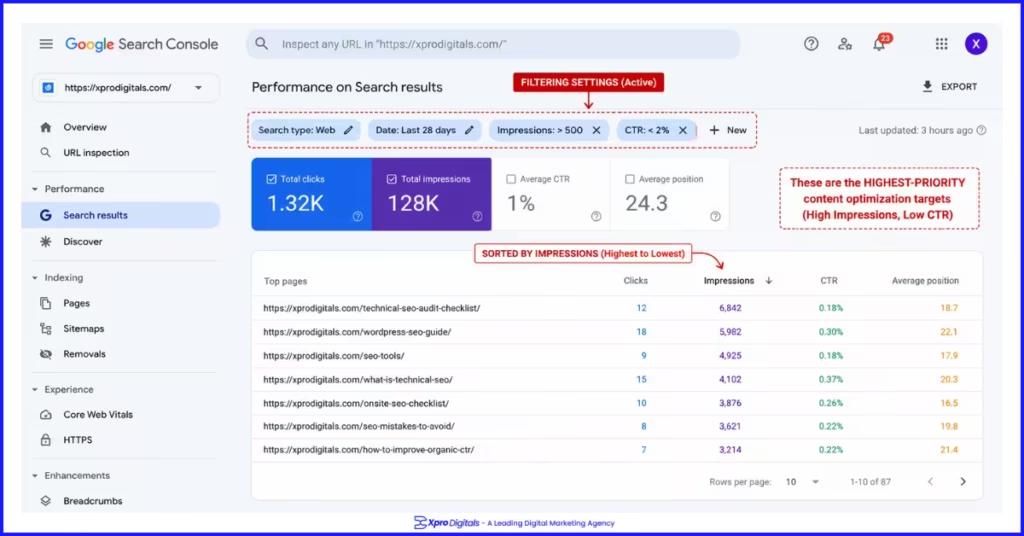
| High-impression, low-CTR pages identified | GSC Performance Report | CTR above 2% for most pages in their ranking position | Pages ranking positions 5-15 with CTR under 1% | |
| Content freshness on high-value pages | Manual review of top 20 pages by traffic | Statistics and examples current within 12 months | Outdated data or superseded information in ranking content | |
| Content covers topic completely vs competitors | Manual SERP review for each target keyword | Page addresses all subtopics top competitors cover | Multiple subtopics in competitors’ content absent from yours |
Audit Section 9: Backlink and Off-Page Audit
Backlinks remain one of Google’s strongest ranking signals. An off-page audit reveals the current authority of your domain relative to competitors, identifies any toxic links that could be suppressing rankings, and surfaces link building opportunities that could accelerate ranking improvements.
Backlink Audit Checks
| Check | Tool | Pass Criteria | Fail Signal | Done? |
| Total referring domains vs key competitors | Ahrefs or Semrush | Comparable or growing referring domain count | Significant gap below key competitors | |
| No manual action for unnatural links | GSC Manual Actions Report | Zero manual actions reported | Manual action: unnatural links to your site | |
| No toxic or spammy referring domains | Ahrefs Backlink Profile | Backlink profile dominated by relevant, credible sources | High proportion of links from unrelated or low-quality sites | |
| Backlink anchor text diversity | Ahrefs Anchors Report | Mix of brand, URL, and keyword anchors naturally | Unnatural over-concentration of exact-match keyword anchors | |
| No lost high-value backlinks recently | Ahrefs Lost Backlinks Report | No significant high-authority links lost in past 90 days | Recent loss of links from major industry publications | |
| Competitor backlink gap identified | Ahrefs Link Intersect | Clear list of sites linking to competitors but not to you | No competitor backlink analysis conducted |
Audit Section 10: Local SEO Audit
This section applies to businesses with a physical location or defined service area. For businesses without geographic focus, mark as N/A and proceed to the next section.
Local SEO Audit Checks
| Check | Tool | Pass Criteria | Fail Signal | Done? |
| Google Business Profile claimed and verified | Google Business Profile | GBP verified with complete business information | Unclaimed or unverified GBP profile | |
| GBP information complete and accurate | GBP Dashboard | All sections complete including services and photos | Missing hours, no photos, or incomplete service list | |
| NAP consistent across all directories | Manual check of key directories | Identical name, address, phone across all platforms | Different address format or phone number on any platform | |
| Review count competitive with local pack | Manual SERP check for target local keywords | Review volume comparable to top 3 Map Pack results | Significantly fewer reviews than Map Pack competitors | |
| Business responds to all reviews | GBP Reviews Section | Response to every review within 48 hours | Unanswered reviews especially negative ones | |
| LocalBusiness schema on website | Google Rich Results Test | Schema present with name, address, phone, hours | No LocalBusiness schema on homepage or contact page | |
| Location-specific content on website | Manual review of location pages | Location keyword and area context in page content | Generic pages with city name swapped in template |
For a complete local SEO audit framework covering GBP, citations, reviews, and local content, our Google Business Profile audit checklist provides the structured review process for every element of local search visibility.
Audit Section 11: E-E-A-T Signals Audit
E-E-A-T signals are assessed both at the page level through content and authorship, and at the site level through trust infrastructure and external recognition. An E-E-A-T audit identifies gaps that suppress performance, particularly on YMYL topics where Google applies its most rigorous quality standards.
E-E-A-T Audit Checks
| Check | Pass Criteria | Fail Signal | Done? |
| Named author on all content pages | Every post or guide has named author with credentials | Anonymous content or generic ‘Admin’ authorship | |
| Author bio with professional credentials visible | Bio includes qualifications, experience, and external profile link | Author name only with no credentials or context | |
| About page clearly describes business and team | Named team, credentials, business history, and contact details | No About page or generic placeholder content | |
| Contact page with direct contact information | Physical address, phone, and email all accessible | Contact form only, no direct contact details | |
| Privacy policy accurate and current | Policy reflects actual data collection and usage practices | No privacy policy or outdated generic policy | |
| Factual claims cited with authoritative sources | Statistics and claims linked to credible external sources | Unsourced statistics or assertions without evidence | |
| Content updated regularly on key pages | Last updated date visible, content reflects current information | Outdated information with no update date visible | |
| Genuine customer reviews present and recent | Regular review flow across the past 12 months | No reviews or last review more than 6 months ago |
E-E-A-T is a critical quality signal that Google uses to evaluate both page and site credibility. For the complete guide to building all four E-E-A-T dimensions, our E-E-A-T guide for SEO covers every signal with specific implementation steps.
The Master SEO Audit Checklist: All Checks in Priority Order
| Priority | Section | Check | Status |
| Critical | Crawlability | Robots.txt not blocking key pages | |
| Critical | Crawlability | XML sitemap submitted and error-free | |
| Critical | Indexation | All key pages indexed in Google | |
| Critical | Indexation | No accidental no-index on published pages | |
| Critical | Technical | LCP passes on mobile (under 2.5s) | |
| Critical | Technical | INP passes on mobile (under 200ms) | |
| Critical | Technical | CLS passes on mobile (under 0.1) | |
| Critical | On-Page | No missing title tags | |
| Critical | On-Page | Single H1 with primary keyword on all pages | |
| Critical | On-Page | Content matches search intent | |
| High | Crawlability | No crawl errors on key pages | |
| High | Crawlability | No redirect chains over one hop | |
| High | Crawlability | No broken internal links | |
| High | Technical | All images in WebP, under 150KB average | |
| High | Technical | Hero image not lazy loaded, fetchpriority set | |
| High | Mobile | No mobile usability errors in GSC | |
| High | Mobile | Tap targets 48px minimum | |
| High | On-Page | No duplicate title tags | |
| High | On-Page | No thin or duplicate content indexed | |
| High | Canonical | Every page has a canonical tag | |
| High | Canonical | Product variants canonicalised | |
| High | Schema | Correct schema type applied per page type | |
| High | Schema | Zero schema errors in Rich Results Test | |
| High | Content | No keyword cannibalism between pages | |
| High | Content | High-impression low-CTR pages identified | |
| High | Off-Page | No manual actions for unnatural links | |
| High | E-E-A-T | Named author with credentials on all content | |
| High | E-E-A-T | About page and privacy policy complete | |
| Medium | Architecture | Key pages within 4 clicks of homepage | |
| Medium | Architecture | No orphaned pages without internal links | |
| Medium | Architecture | Faceted navigation controlled | |
| Medium | Schema | FAQPage and AggregateRating schema where relevant | |
| Medium | Content | Content freshness on top 20 pages | |
| Medium | Off-Page | Competitor backlink gap identified | |
| Medium | Local | GBP verified and complete | |
| Medium | Local | NAP consistency across directories |
Step-by-Step: How to Run a Complete SEO Audit in Two Days
Day One Morning: Technical Foundation (3-4 Hours)
Start Screaming Frog and run a full site crawl while opening Google Search Console in parallel. In GSC, review the Coverage Report for exclusion reasons, the Core Web Vitals Report for failing pages, and the Performance Report to identify high-impression, low-CTR pages. When the Screaming Frog crawl completes, export and filter for: crawl errors, no-index pages, missing titles, duplicate titles, redirect chains, and orphaned pages. Document all issues with specific URLs.
Day One Afternoon: Performance and Schema (2-3 Hours)
Run your five most important page types (homepage, category, product, service, blog) through Google PageSpeed Insights on mobile. Record LCP, INP, and CLS scores. Run each through Google Rich Results Test. Check for schema errors, missing required properties, and schema-content mismatches. Note every failing item with the specific page URL and the exact error message shown.
Day Two Morning: Content, Backlinks, and Local (3-4 Hours)
Export your top 50 pages by impressions from GSC Performance. For each, note the primary keyword it ranks for (or should rank for), its average position, and its CTR. Identify keyword cannibalism by checking whether multiple pages target the same keyword. Run your domain through Ahrefs or Semrush to review your backlink profile and identify toxic or lost links. If you serve a local market, audit your GBP against the local SEO checklist.
Day Two Afternoon: Prioritise and Plan (1-2 Hours)
Compile all findings into a single document. Categorise each finding as Critical, High, or Medium priority using the priority framework in the master checklist. For each finding, note the specific fix, the tool or person needed to implement it, and an estimated completion date. Share the prioritised fix list with your team or agency with clear ownership assigned.
SEO Audit Tools: What You Need and What Each Does
| Tool | Cost | Primary Audit Function | What It Finds |
| Google Search Console | Free | Indexation, performance, Core Web Vitals field data | Coverage errors, CTR data, ranking positions, CWV failures |
| Screaming Frog | Free up to 500 URLs, paid beyond | Full site crawl and on-page analysis | Crawl errors, duplicate content, missing tags, redirects, canonical issues |
| Google PageSpeed Insights | Free | Core Web Vitals and performance diagnostics | LCP, INP, CLS scores, specific optimization recommendations |
| Google Rich Results Test | Free | Schema markup validation | Schema errors, missing properties, rich result preview |
| Google Mobile-Friendly Test | Free | Mobile usability check | Viewport, tap target, and text size issues |
| Ahrefs or Semrush | Paid (from 130 USD/month) | Backlink analysis, keyword research, competitor gaps | Referring domains, lost links, anchor text, competitor keywords |
| Siteliner | Free limited, paid for full | Duplicate content detection | Near-duplicate pages, internal duplicate text |
| BrightLocal | Paid (from 29 USD/month) | Local SEO tracking and citation audit | Map Pack rankings, citation consistency, review monitoring |
People Also Ask: SEO Audit Checklist
What Is an SEO Audit and Why Do I Need One?
An SEO audit is a systematic review of your website across every factor that influences search engine rankings. It identifies technical problems that prevent pages from being crawled or indexed, on-page issues that reduce relevance signals, content gaps that leave ranking opportunities uncaptured, and off-page weaknesses that limit domain authority. You need one because SEO problems are often invisible in normal website use but consistently suppress organic performance until they are found and fixed.
How Often Should I Do an SEO Audit?
Run a full SEO audit quarterly for actively managed websites. Additionally, run a focused audit immediately after any significant site change: platform migration, theme update, major content restructure, new plugin or app installation, or URL structure changes. These events frequently introduce technical issues that suppress rankings if left undetected. Monthly monitoring through Google Search Console alerts catches critical new issues between full audits.
What Are the Most Important Things to Check in an SEO Audit?
Prioritise in this order: crawlability and indexation (can Google access and index your pages?), Core Web Vitals on mobile (are they passing?), title tags and content intent match (does each page clearly target a specific query?), canonical tags (is duplicate content resolved?), and schema markup (are rich results enabled?). Fixing critical issues in these five areas delivers the fastest improvement for most sites.
What Tools Do I Need for a DIY SEO Audit?
Google Search Console (free), Screaming Frog (free up to 500 URLs), Google PageSpeed Insights (free), Google Rich Results Test (free), and Google Mobile-Friendly Test (free) cover the majority of a technical and on-page audit without paid subscriptions. For backlink analysis and keyword gap research, Ahrefs or Semrush require a paid plan. These five free tools alone cover the most critical audit sections for most small and medium websites.
How Long Does an SEO Audit Take?
A comprehensive SEO audit for a site under 1,000 pages takes two to three days when conducted systematically using the tools and process in this guide. A focused audit covering only technical and on-page areas takes one day. Large ecommerce sites with tens of thousands of pages require a week or more for thorough coverage. Agency audits for new clients typically take three to five business days including analysis and report preparation.
What Is the Difference Between a Free SEO Audit and a Professional One?
Free automated SEO audits produced by online tools flag issues detected by automated crawlers without human interpretation of priority, context, or business impact. They frequently surface hundreds of minor issues while missing the critical structural problems that actually suppress rankings. A professional SEO audit combines automated crawl data with experienced human analysis that identifies which issues are genuine performance blockers and sequences fixes by business impact rather than by issue volume.
Can I Do an SEO Audit Myself or Do I Need an Agency?
You can conduct a meaningful SEO audit independently using the checklist in this guide and the free tools listed. The main limitation of a DIY audit is interpreting findings in context. For example, identifying that 200 pages are set to no-index is straightforward. Knowing whether those 200 pages should be no-indexed or whether they are accidentally excluded requires judgment that comes with SEO experience. For high-value sites or complex issues, professional interpretation of audit findings adds significant value.
What Should Be Fixed First After an SEO Audit?
Fix indexation and crawlability blockers first. If any important pages are not being crawled or indexed, every other improvement is wasted effort on invisible pages. After confirming all key pages are accessible, fix Core Web Vitals failures on your highest-traffic pages, then on-page issues on pages ranking positions five to twenty (where improvements have the fastest impact), then schema errors, then content quality improvements on thin or underperforming pages.
How Do I Know if My SEO Audit Was Successful?
A successful audit produces a prioritised list of specific, actionable fixes with clear implementation steps. Within four to eight weeks of implementing Critical and High priority fixes, you should see measurable improvements in Google Search Console: fewer coverage errors in the Coverage Report, improved Core Web Vitals scores in the Core Web Vitals Report, and improving average positions for target keywords in the Performance Report. If none of these metrics move after eight weeks, the fixes either were not implemented correctly or additional issues remain unaddressed.
Does an SEO Audit Also Improve User Experience?
Yes, directly. The improvements required to pass an SEO audit, fast page loading, mobile-friendly design, clear site navigation, accurate content, logical structure, are also the improvements that create a better experience for human visitors. A site that passes Core Web Vitals loads faster for users. A site with clear internal linking is easier for users to navigate. An SEO audit is effectively a user experience audit that uses search engine requirements as the quality standard.
What Is a Technical SEO Audit vs a Full SEO Audit?
A technical SEO audit focuses exclusively on site infrastructure: crawlability, indexation, page speed, mobile usability, canonical tags, schema markup, and site architecture. A full SEO audit extends this to include on-page content and keyword analysis, content quality and gaps, backlink profile evaluation, local SEO signals, and E-E-A-T signals. For most businesses, a full audit that covers all layers is more useful than a technical-only audit because it reveals the complete picture of what is and is not working.
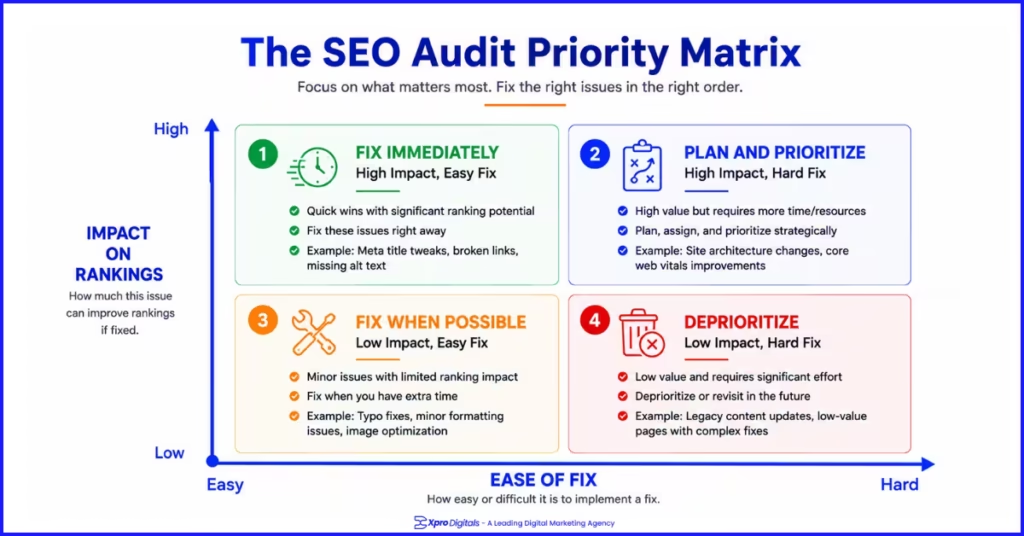
How Do I Prioritise SEO Audit Findings?
Prioritise by two criteria: impact on organic performance (how much will fixing this improve rankings or traffic?) and ease of implementation (how quickly and cheaply can this be fixed?). Critical priority fixes are those that block pages from ranking entirely, such as no-index tags and crawl blocks. High priority fixes are those that suppress ranking positions on accessible pages, such as failing Core Web Vitals and content intent mismatches. Medium priority fixes are those that improve performance incrementally, such as adding schema or refreshing content.
Should I Fix All SEO Audit Issues or Just the Most Important Ones?
Focus on Critical and High priority issues first. Low-priority issues, such as missing alt text on decorative images or minor duplicate content in footer links, have minimal ranking impact and are not worth delaying high-impact fixes. A common audit mistake is attempting to resolve every flagged item simultaneously, which dilutes effort and slows the improvement of the issues that actually matter. Fix the top ten highest-impact issues first, verify the impact, then address lower-priority items systematically.
What SEO Issues Are Found Most Often in Audits?
The most common findings across business website audits are: missing or duplicate title tags, pages with thin content under 200 words, images not in WebP format causing LCP failures, no schema markup on key page types, keyword cannibalism between blog posts, orphaned pages with no internal links, NAP inconsistencies across directories for local businesses, and missing author attribution on content pages. These issues appear across the majority of sites we audit regardless of industry or platform.